Site · Newsletter
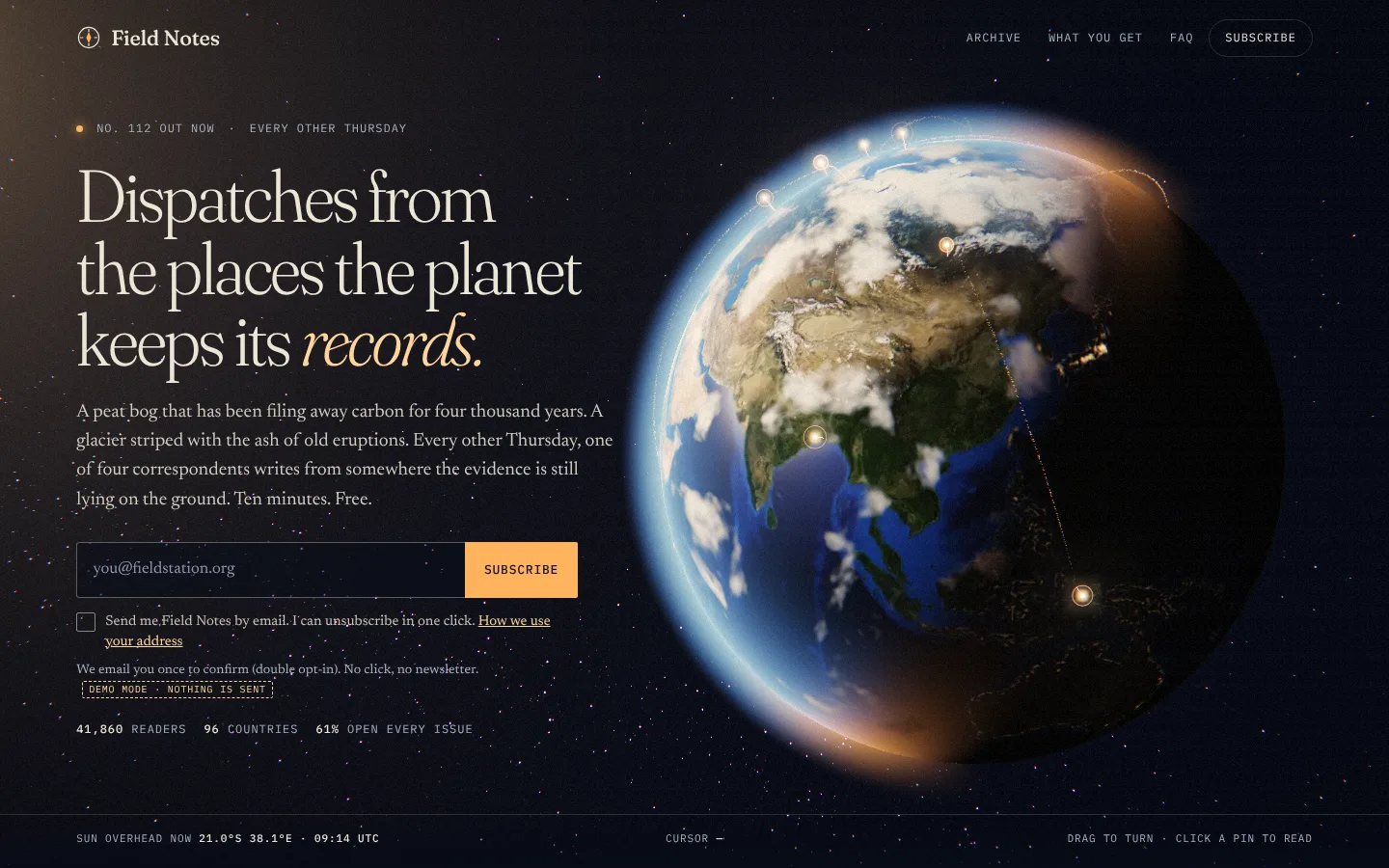
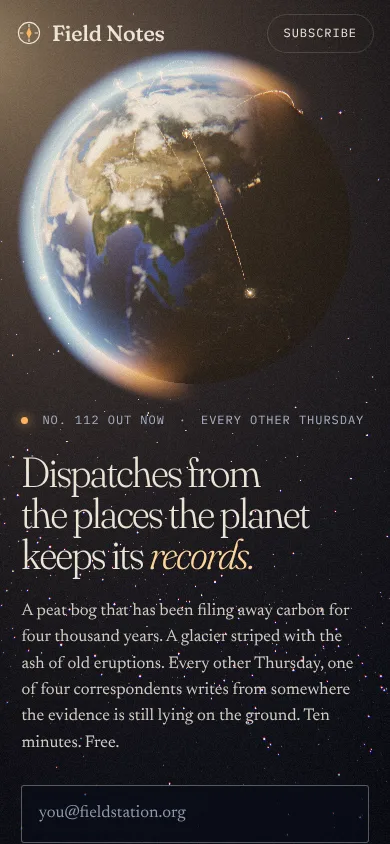
Field Notes Nature newsletter landing with a 3D globe of field reports
A subscribe page for a nature and science newsletter: a live 3D globe pins every issue's field report, with an archive and a platform-ready sign-up form.
What's in the prompt
- A full written spec: layout, tokens, every animation with its numbers, responsive rules
- The complete working code as the reference implementation, also as a ready-to-run .zip with every image, video and 3D model
- Accessibility, reduced motion and fallbacks already handled
- A “Make it yours” checklist so your site looks like nobody else’s
- Type
- Site
- Built with
- HTML, CSS, JS · three.js 0.170.0
- Prompt size
- 135 KB
- Tags
- newsletter landing page, ghost, kit, webgl globe
- Updated
- 2026-11-26
Use it in three steps
- Copy the prompt with the button above.
- Paste it into your AI (Claude, Claude Code, ChatGPT, Cursor…) and add your edits.
- Launch the single
index.htmlanywhere: Cloudflare Pages, Netlify, GitHub Pages.
About the Field Notes design
Field Notes is a landing page for a fictional free nature and science newsletter that comes out every other Thursday, written by four correspondents from places such as a peat bog, a coral reef and a glacier. A night-blue hero and atlas give way to a warm paper-and-ink body. Fraunces sets the headlines, Newsreader the body, IBM Plex Mono the labels and HUD, and Caveat only the hand-written margin notes. The hero is a live 3D Earth built from public-domain satellite day and night-lights maps, with its day and night sides placed from the real sun position when the page loads.
Each past issue is a glowing pin at the place it was written, and particle streams run along great circles between the issues in date order. Hovering a pin shows its title and place. Clicking flies the camera there while the sunlight swings round to morning, then opens the issue in a reader. The globe idles, tilts toward the cursor and can be dragged, and the HUD shows the subsolar point and the cursor's latitude and longitude. Below come reader numbers, an annotated issue, a 12-issue archive with filters, search and sort, the correspondents, an FAQ and a footer sign-up with a countdown.
Good for
- Nature, climate and science newsletters: each issue is pinned at the place it was reported from
- Travel or field-report writers: the fly-to and reader make an archive of places easy to browse
- Publications with several correspondents: each writer gets an initials stamp, a topic and a home base
- Ghost publishers: the official signup embed is built in and loads only after consent
- Fortnightly letters: the calendar, next issue number and countdown all derive from one date anchor
How Field Notes is built
- Globe from two texture plates. A day map and one packed texture (water mask, topography and city lights in R, G and B) drive bump-mapped land, ocean glint from the water mask, a twilight band, warm city lights on the night side and a fresnel rim, on a 192×128 sphere (112×72 on the low tier).
- Sun placed from the clock. A low-precision solar formula (mean longitude, anomaly, obliquity and sidereal time) finds the subsolar point at page load, the globe's starting spin turns it to face the hero light, and the HUD prints it.
- Fly-to with a moving sun. Clicking a pin tweens spin and tilt over 1.7 s with ease-in-out-cubic, blends the camera into a close shot and swings the light from the hero direction to a focus direction so the pin lands in morning light, then opens the reader with
showModal(). - Comet streams between issues. 40k points (9k on the low tier) slerp along great circles between consecutive issues, lift into an arc and fade by
sin(πt)·aT^2.2, so each leg reads as a comet with a tail. - Consent-gated sign-up. In Ghost and embed modes the email field hides and the platform's form loads only after the consent box is ticked; the native modes keep validation, a
websitehoneypot andaria-liveerrors.
Images, video and 3D
A 2048×1024 day map and a packed water, topography and city-lights texture made from public-domain satellite imagery (about 245 KB for the globe), twelve 1000px documentary issue plates made with an AI image generator in one 35 mm-film grade (under 182 KB each, lazy-loaded), and a 900×900 poster rendered from the live globe for the fallback. Clouds, stars and routes are procedural. To make your own, keep the two globe plates and replace the issue plates with photos from your own places.
Build it with Claude
Ask Claude for the full index.html. With no WebGL2 (or ?static) the page shows the poster globe, and the atlas list and archive buttons still open each issue in the reader, so the preview can test the content. Leave CONFIG.provider on demo and check the form errors and success state, the archive search and the Ice filter count, and the reader's Prev and Next.
Build it with Claude Code
Put the textures, the poster and the twelve issue plates in assets/ and serve with npx serve. Ask Claude Code to set CONFIG.provider to "ghost" with your CONFIG.ghost.site, or to "embed" with the code your newsletter platform gives you pasted into CONFIG.embedHtml, and to confirm with request interception that nothing loads from the platform before consent. Never put an API key in the page; use "custom" with your own endpoint for that.
Build it with ChatGPT
Ask ChatGPT for the page in parts, or in canvas: the HTML and CSS, the issue data with coordinates, the globe, cloud and atmosphere shaders, the stars and routes, the camera shots and fly-to, then the form and its provider modes. A common follow-up is pin placement: check that the latitude and longitude conversion matches SphereGeometry's UVs, with ph = (lon + 180)°, or the pins will sit in the wrong ocean.
If it doesn’t work
- Pins land in the wrong places: convert with
x = −cos(ph)cos(lat),y = sin(lat),z = sin(ph)cos(lat)andph = lon + 180°, which matches the texture's UVs. - The globe is hidden behind the text on tablets: below 900px wide or under 1.1 aspect, centre it at the top and set the hero's top padding from JS so the copy flows below it.
- The page keeps rendering after the visitor scrolls into the paper body: pause on an IntersectionObserver for the night zone and on
visibilitychange.
Questions about Field Notes
How do I connect the Field Notes sign-up form to my newsletter?
Set CONFIG.provider to "ghost" and your site URL to load Ghost's official signup embed, to "embed" and paste the embed code from another newsletter platform, or to "custom" to POST to your own endpoint. The default demo mode sends nothing. Never put an API key in the page: none of these modes needs one, and a key belongs on your server.
Is the Field Notes globe showing live data?
Partly. The day and night sides are set from the real sun position when the page loads, and the HUD shows that point. The clouds are procedural rather than today's weather, and the publication, correspondents, readers and issues are fictional.
Make it yours
This prompt rebuilds one exact design. If everyone ships it unchanged, the sites will look alike. Before you paste it, change these lines so the result is yours. Each change is one edit to the prompt; the structure and the interactions stay intact.
- Brand and beat. Swap Field Notes, its four correspondents and the nature/science beat for your own newsletter. Keep 12 archive issues and 3–6 topics, so the chips, the grid and the atlas list stay balanced. Every issue still needs a real place with coordinates.
- Re-theme the globe. Keep the pins, fly-to and reader, but change what the sphere is: - the Moon (LRO colour map, no clouds or lights; pins are landing sites) for a space letter; - Mars (MOLA shaded relief, dust-orange atmosphere) for a geology letter; - a night-only Earth (Black Marble only, gold city lights, no day side) for a cities or travel letter; - an ocean-only globe (bathymetry ramp, land in flat ink) for a marine letter.
- Palette. Replace paper
#f2ebdd, ink#1d1812, rust#a3401e, night#070c18and glow#ffb35cwith your own. Keep muted text ≥ 4.5:1 on its background. The glow colour drives the pins, the button and the route comets, so change them together. - Type pairing. Swap Fraunces + Newsreader for another display serif and reading face (e.g. Instrument Serif + Literata, or Playfair + Source Serif 4). Keep a mono for the HUD and labels, and keep or drop the hand-written annotation face.
- Images. Replace the 12
issue-*.webpplates with photos from your own issues, or regenerate them with one shared recipe: "documentary 35mm film photograph of {place}, overcast soft light, muted colour, fine grain, no people, no text". Keep them at 3:2, about 1000px and under 200 KB each. - Signature details. Change the sealed next-issue pin to your own teaser, the HUD readouts (e.g. local time at the latest pin instead of the subsolar point), and the route order (by topic instead of by date).
- Copy voice. Rewrite the headline, deck, FAQ and reader excerpts in your own voice, with a concrete number in every issue. Avoid "unlock", "journey" and "dive into".
- Provider. Set
CONFIG.provider, then fillCONFIG.ghost,CONFIG.embedHtmlorCONFIG.custom, following "Connect your newsletter" above.
Tell your AI: "Build exactly as specified, but with these changes: …", then list your edits.