Site · Newsletter
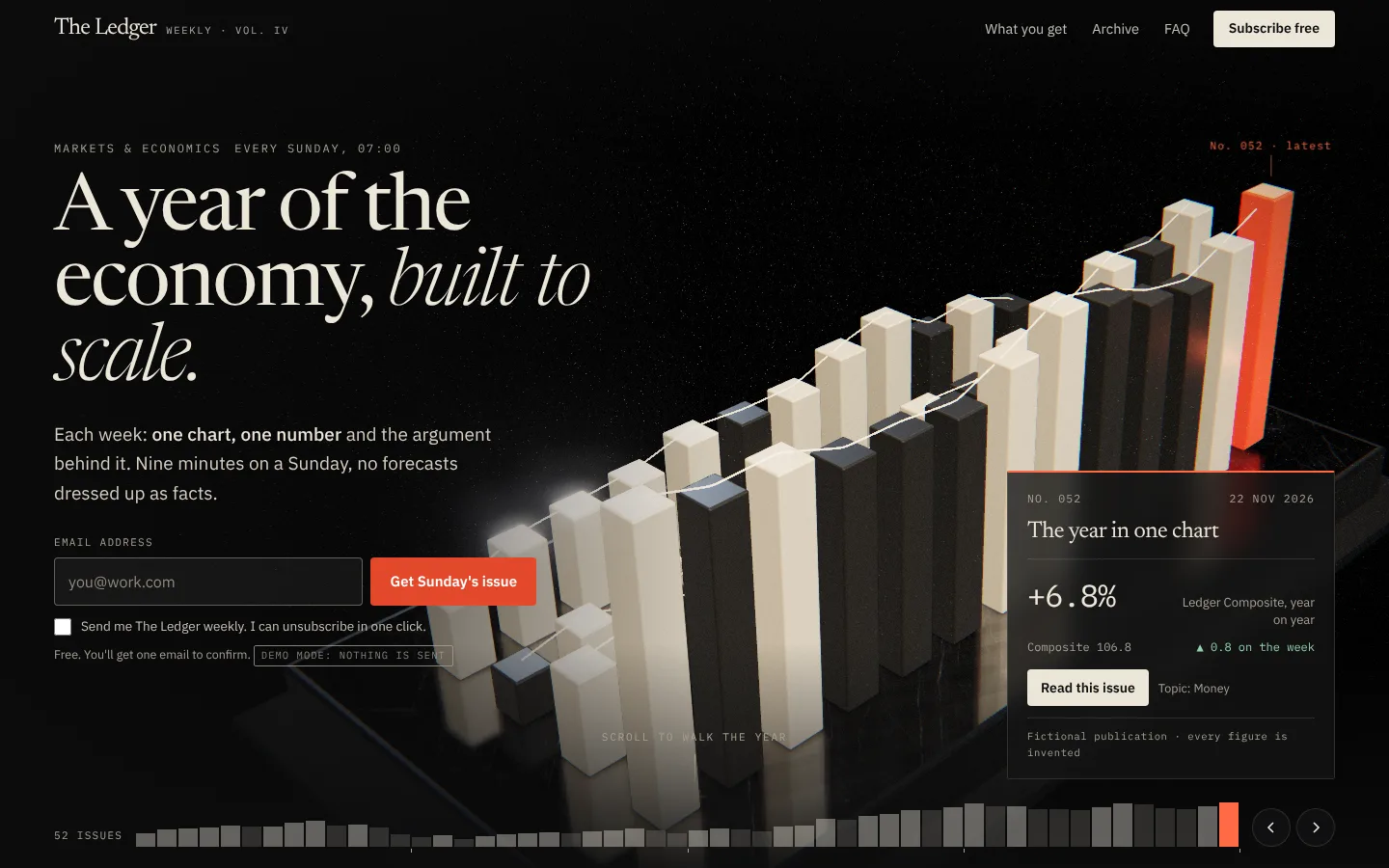
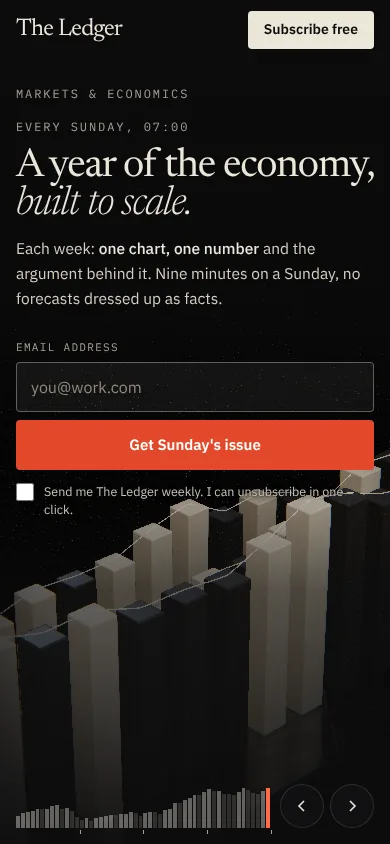
The Ledger Finance newsletter landing with a live 3D chart sculpture
A subscribe page for a weekly markets newsletter where a 3D chart sculpture builds from the last 52 issues, with an issue archive and a sign-up form that connects to your newsletter platform.
What's in the prompt
- A full written spec: layout, tokens, every animation with its numbers, responsive rules
- The complete working code as the reference implementation, also as a ready-to-run .zip with every image, video and 3D model
- Accessibility, reduced motion and fallbacks already handled
- A “Make it yours” checklist so your site looks like nobody else’s
- Type
- Site
- Built with
- HTML, CSS, JS · three.js 0.170.0
- Prompt size
- 138 KB
- Tags
- newsletter landing page, beehiiv, substack, three.js
- Updated
- 2026-11-26
Use it in three steps
- Copy the prompt with the button above.
- Paste it into your AI (Claude, Claude Code, ChatGPT, Cursor…) and add your edits.
- Launch the single
index.htmlanywhere: Cloudflare Pages, Netlify, GitHub Pages.
About the The Ledger design
The Ledger is a landing page for a fictional weekly markets newsletter: one chart, one number and the argument behind it, every Sunday at 07:00. It is editorial in ink, bone and one ledger red, with Newsreader for display, IBM Plex Sans for body and IBM Plex Mono for every number. The hero is a live 3D chart sculpture: 52 towers, one per past issue, rise from a polished black-marble plinth in four rows of thirteen weeks. Each tower's height is that week's composite index, bone towers rose and graphite towers fell, and the newest issue stands in red at the front corner.
Scrolling through a 280vh sticky hero orbits the camera about 80° and pushes in on the red tower. Every tower can be hovered or clicked, and all 52 are reachable from the keyboard through a bar-chart tape along the bottom. Below come reader numbers, an annotated sample issue, an editor's note, a filterable archive of twelve issues that open in a reader with a chart, an FAQ and a footer sign-up with a countdown to Sunday. One CONFIG.provider switch connects both forms to a newsletter platform, and the page says several times that the publication and its figures are fictional.
Good for
- Finance and economics newsletters: each tower's height is that issue's number, so the hero shows the year
- Data journalists and analysts: the tape, card and reader turn a dataset into a browsable archive
- Weekly publications with a fixed cadence: 52 towers and a live countdown match a weekly schedule
- Ghost publishers: the official signup embed is built in and loads only after consent
- Policy and research letters: the annotated sample issue explains a fixed five-part format before anyone signs up
How The Ledger is built
- Data towers with spring physics. Each tower is a
RoundedBoxGeometrywhose height is .55 + normalised level × 3.7; after the preloader they rise on springs (k 120, c 15) staggered 22 ms apart, integrated in 16 ms substeps so a slow frame cannot make them overshoot. - Polished marble with baked shadows. A
Reflectorwith a custom shader blurs the mirror more on the marble's veins and multiplies a baked contact-shadow map drawn once on a 1024-wide canvas, with each tower casting a soft shadow .75 × its height long. - Dust with depth of field. 220k, 110k or 60k points by tier compute a circle of confusion in the vertex shader from their distance to the camera target, grow with it, and dim as 1 / (1 + 2.5·coc²) so blurred motes do not brighten.
- Scroll camera with view offset. Three spherical camera keys blend with smoothstep over the hero's scroll progress, damped at 1 − e^(−5·dt), while
setViewOffsetshifts the sculpture 15% right of the headline on desktop and below the copy on phones. - One handler for every platform. Both forms share validation, a consent box, a
company_urlhoneypot and accessible errors; Ghost's official embed and pasted platform embeds load only after consent, and the custom mode POSTs JSON to your own HTTPS endpoint.
Images, video and 3D
About 0.73 MB of WebP images: a generated black-marble slab texture with its roughness map, six documentary-style photos (five for the issues and one of the editor's desk) made with an AI image generator in one muted 35 mm grade, and a 1600×1000 poster rendered from the live scene for the no-WebGL fallback. The towers, price lines and dust are procedural, so there is no GLB or video. To re-theme it, regenerate the plinth material and photos, then re-render the poster from your scene.
Build it with Claude
Ask Claude for the full index.html. three.js loads with dynamic import() in a try/catch, so the tape, card, archive and forms still work in the preview if WebGL does not. Leave CONFIG.provider on demo there and check the three form errors (empty email, bad email, consent unticked), then the success state, the Energy filter and the reader's newer/older arrows. Use ?provider= to preview another mode.
Build it with Claude Code
Put the nine WebP files in assets/ and serve the folder with npx serve. Ask Claude Code to set CONFIG.provider to "ghost" with your CONFIG.ghost.siteUrl, or to "embed" with the code your newsletter platform gives you pasted into CONFIG.embedHtml, and to confirm with request interception that nothing loads from the platform before the consent box is ticked. Never add an API key to the page; for an API, use "custom" and keep the key on your server.
Build it with ChatGPT
Ask ChatGPT for the page in parts, or in canvas: the HTML and CSS, the 52-issue data and seeded random walk, the three.js sculpture, the post chain, then the form handler with its provider modes. A common follow-up is the pasted embed: check that each <script> in the snippet is re-created after insertion so it runs, and that closing script tags inside the page's own script are written as <\/script>.
If it doesn’t work
- The plinth loses its marble and shadow after the Reflector is created: Reflector clones its uniforms, so re-assign
tStoneandtAOafter construction. - A pasted platform embed shows nothing: insert it after consent and re-create each
<script>element, because scripts added with innerHTML do not run. - The issue card covers the form on tablets: keep it hidden under 900px until scroll progress passes .16 or the visitor picks a tower.
Questions about The Ledger
Which newsletter platforms can The Ledger's sign-up form connect to?
Set CONFIG.provider to "ghost" to load Ghost's official signup embed with your site URL, to "embed" to paste the embed code another newsletter platform gives you, or to "custom" to POST JSON to your own endpoint. A demo mode, the default, validates and sends nothing. API keys must never go in the page; keep them on your own server behind the custom endpoint.
Are The Ledger's charts and figures real data?
No. The composite index is a seeded random walk scaled to end at +6.8%, and the readers, quotes and issues are invented. The page says so in the issue card, the reader captions, the readers section and the footer. Replace the data with your own issues before launch.
Make it yours
This prompt rebuilds one exact design. If everyone ships it unchanged, the sites will look alike. Before you paste it, change these lines so the result is yours. Each change is one edit to the prompt; the structure and the interactions stay intact.
- Publication and beat. Swap "The Ledger" and markets/economics for your own newsletter: a climate letter, a design-industry weekly, a local-politics digest, a football analytics sheet. Keep the 52-issue year, the seven topics (rename them) and twelve archive issues with two paragraphs each, so the archive and the tape stay balanced. Keep a line saying which numbers are illustrative.
- Re-theme the sculpture, not the mechanic. Keep the 52 towers, the camera journey, picking and tape, and change what they are: - the heights of glacier ice cores standing in a frost tray; - stacked vinyl records, one stack per weekly playlist; - lit apartment blocks for a city newsletter; - stacks of coins for a personal-finance letter.
Keep one accent colour for the newest one, and a line that rides the tops.
- Palette. Replace ink
#0c0c0d, paper#f3eee4, bone#e8e1d3and ledger red#b8321a/#ff6b46with your own trio (for example deep pine, oat and signal yellow). Keep muted text ≥ 4.5:1 on both grounds, and red-on-paper text ≥ 4.5:1. - Type pairing. Swap Newsreader + IBM Plex Sans + IBM Plex Mono for another serif or display face with a plain sans and a true mono (for example Fraunces + Public Sans + JetBrains Mono, or Instrument Serif + Geist + Geist Mono). Keep a mono for every number.
- Plinth material. Regenerate
stone.webpas your own top-down material (travertine, oxidised steel, walnut, terrazzo, frosted glass). Keep it seamless, flat-lit and dark enough that the reflections read. Re-renderhero-poster.webpfrom your live scene after the change. - Photos. Replace the six issue photos with your own beat, in one consistent grade: same film stock, same time of day, no people's faces, no text. For example, coastlines in fog for a climate letter, or empty stadiums at dawn for sport.
- Voice. Rewrite every headline, dek and FAQ answer in your own voice. Be specific ("one chart, one number, nine minutes on a Sunday"), never "unlock insights".
- Platform. Set
CONFIG.providerto your platform and fillCONFIG.ghost,CONFIG.embedHtmlorCONFIG.custom, following "Connect your newsletter".
Tell your AI: "Build exactly as specified, but with these changes: …", then list your edits.