Section · Pricing
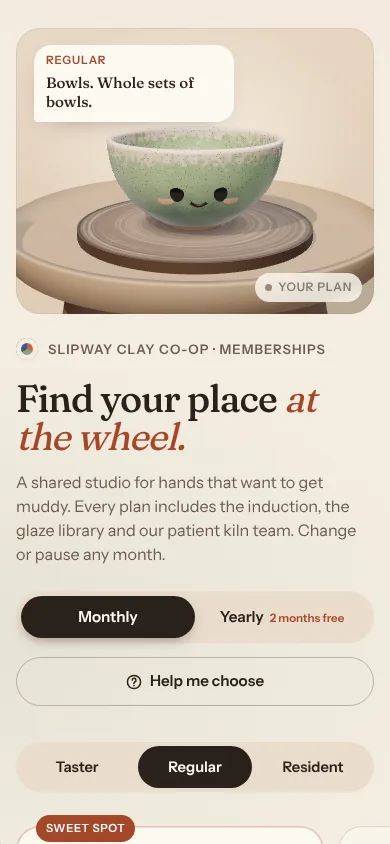
Slipway Pricing table with a living 3D mascot
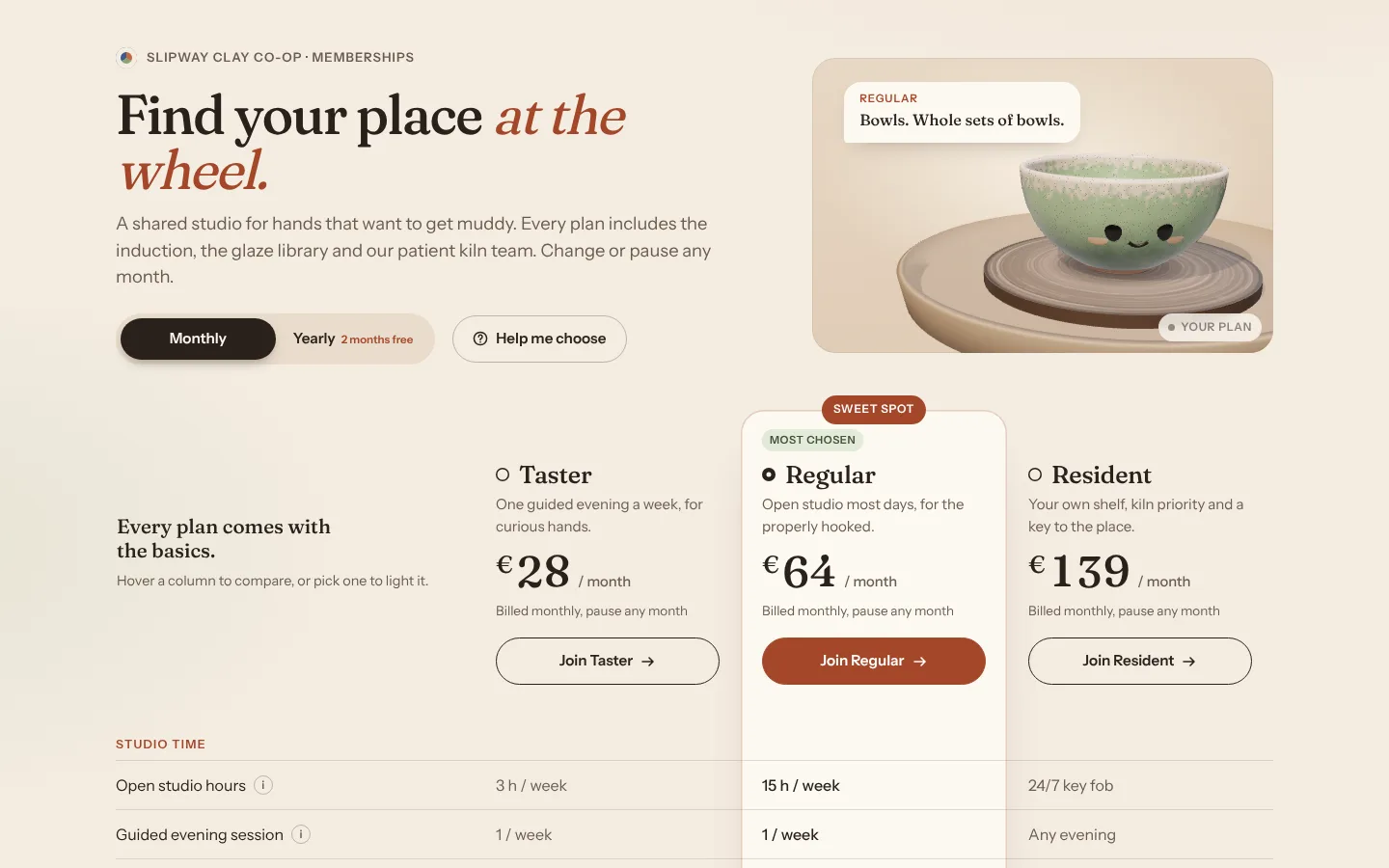
A pricing and comparison section where a pot on a potter's wheel reshapes itself for each plan. Monthly/yearly prices roll like an odometer, and a three-question quiz picks the plan for you.
What's in the prompt
- A full written spec: layout, tokens, every animation with its numbers, responsive rules
- The complete working code as the reference implementation
- Accessibility, reduced motion and fallbacks already handled
- A “Make it yours” checklist so your site looks like nobody else’s
- Type
- Section
- Built with
- HTML, CSS, JS · three.js 0.170.0
- Prompt size
- 101 KB
- Tags
- pricing table, comparison table, billing toggle, plan quiz
- Updated
- 2026-11-26
Use it in three steps
- Copy the prompt with the button above.
- Paste it into your AI (Claude, Claude Code, ChatGPT, Cursor…) and add your edits.
- Launch the single
index.htmlanywhere: Cloudflare Pages, Netlify, GitHub Pages.
About the Slipway design
Slipway is a pricing section for a fictional community pottery studio, and it borrows its look from the studio floor: a cream, clay-dusted ground, warm ink, and one terracotta accent for buttons and labels. Fraunces gives the headline a hand-thrown feel, while Instrument Sans keeps the 14-row table easy to scan. The signature is a live three.js pot on a spinning wheel head that re-throws itself for each plan, from a terracotta mug to a wide sage bowl to a tall cobalt vase. Its glaze shader pools colour low down, speckles and crawls to bare clay at the rim, so a bigger plan reads as bigger work rather than a longer list of ticks.
A visitor first sees the headline beside the wheel, a Monthly/Yearly switch and a Help me choose button. Until they choose, a cover loop walks the highlight and the pot through the plans every 4 s. Hovering or tapping a column slides a highlight card behind it, and the pot morphs with a wobble, a hop and a burst of spin while the camera reframes it. Switching to yearly rolls every price like an odometer. A three-question quiz recommends a plan, a sticky compare bar follows the table, each Join button opens a sign-up dialog, and phones get swipeable cards.
Good for
- Studios, gyms and makerspaces: three membership tiers map well to the three vessel shapes
- Classes and workshops: the quiz helps a newcomer pick a level without reading every row
- Small SaaS products: the real table and sticky bar handle long feature lists
- Coworking spaces: drop-in, part-time and resident plans fit the same structure
- Subscription boxes: the growing object can become a bigger box or a fuller basket
How Slipway is built
- Live lathe pot with a glaze shader. A custom indexed lathe (112 segments, 72 rows, wall .055) is rebuilt from nine Catmull-Rom profile radii per plan (mug H 96, bowl H 88, vase H 182) while it morphs, and an onBeforeCompile patch adds glaze pooling, two-scale value noise, rim crawl, an unglazed foot and iron speckle.
- Underdamped morph, hop and dolly. A spring sub-stepped at 240 Hz drives the morph (k 150, c 11) so the pot overshoots and wobbles, a hop spring (k 320, c 15, impulse 3.4) lifts and squashes it on each change, and a camera dolly (k 40, c 10) reframes each shape.
- Spring-tracked column highlight. A slip-coloured card sits absolutely behind the real <table> and springs to the measured rect of the lit column with k 240, c 19, so the slide overshoots slightly. Hovering a cell previews a column; clicking selects it.
- Odometer prices. Each price is three slots holding a 0–9 digit strip moved with translateY(−d·10%) over .9s, staggered 70ms right to left. Leading slots collapse to zero width, so €139 rolls cleanly to €116 for yearly billing.
- Idle cover loop. A 250 ms ticker steps through the plans 0, 1, 2, 1 every 4,000 ms, pauses on hover, focus, open dialogs, hidden tabs and reduced motion, and stops for good once a visitor picks a plan or the quiz recommends one.
Images, video and 3D
Only two photos: assets/hands.webp (muddy hands pulling up a terracotta cylinder on a slip-splashed wheel, used in the quiz) and assets/studio.webp (a rough shelf of drying cups and bowls, used in the join dialog header), graded identically with a warm wash and grain. Replace them with your own photos or AI-generated images in similar window light; the pot is built in code, in 3D and in SVG, so it needs no model file.
Build it with Claude
Paste the prompt into claude.ai and ask for a single index.html. If the preview cannot load three.js from the CDN, the inline SVG pot stays and runs the same morph, so the section still works. Switch Monthly/Yearly to watch the digits roll to 23 / 53 / 116, hover each column to see the pot re-throw, and narrow the window below 760px to confirm the table swaps for swipeable cards.
Claude guide →Build it with Claude Code
Create a folder with index.html and an assets/ folder holding hands.webp and studio.webp, then ask Claude Code to build the file from the prompt and serve it locally, for example with python3 -m http.server. Ask it to run a headless check at 390, 768 and 1440 for horizontal overflow, confirm the canvas fades in over the SVG after the first 3D frame and that blocking jsDelivr leaves the SVG pot working, and step through the quiz and the join dialog validation.
Build it with ChatGPT
The spec is long, so ask ChatGPT to write the file in parts (CSS and markup, the classic script with the springs, odometer and quiz, then the three.js module) or to use canvas. Expect to follow up on the pot: check that both the 3D lathe and the SVG fallback use the nine-radius profiles rather than a simple scale, and that the module talks to the page only through window.__pot3d.show(i).
ChatGPT guide →If it doesn’t work
- The highlight card lands in the wrong place after fonts load or the window resizes: re-measure the column rect on resize, via ResizeObserver and after document.fonts.ready, as the spec asks.
- The pot morph looks stiff or snaps: the morph spring must be underdamped (k 150, c 11) and radii must lerp with the unclamped t so they can overshoot, while only the glaze colour is clamped to 0–1.
- The stage goes blank when WebGL fails: keep the SVG pot visible until the first 3D frame has rendered, and only then add .stage.is-3d to fade the canvas in and the SVG out.
Questions about Slipway
Does the Slipway pricing table need a JavaScript library?
Only three.js r170, loaded through an import map for the live 3D pot, and only its RoomEnvironment addon. Everything else is plain CSS and JavaScript, and if WebGL or the CDN fails the inline SVG pot runs the same morph, glaze blend and wheel spin.
Can I use it with four plans instead of three?
The layout is tuned for three plans with 10–16 feature rows, and the colgroup gives each plan 23%. A fourth plan means changing the column widths, the pot profiles and the phone picker, so it is easier to keep three tiers.
Make it yours
This prompt rebuilds one exact design. If everyone ships it unchanged, the sites will look alike. Before you paste it, change these lines so the result is yours. Each change is one edit to the prompt; the structure and the interactions stay intact.
- Brand and offer. Swap "Slipway Clay Co-op" and the three plans (Taster / Regular / Resident) for your own business, tier names, prices and feature rows. Keep 3 plans and 10–16 rows so the table and the sticky compare bar still balance.
- The object on the wheel. The pot that reshapes per plan is the signature. Replace it with one object from your own world that grows with the plan: a plant in a bigger pot, a stack of books, a coffee cup to a pot to an urn, a tent to a cabin. Keep the three-state morph, the colour blend and the speech bubble.
- Palette. Replace the cream, clay and ink tokens and the three glaze ramps with your brand colours. Keep the muted text at ≥ 4.5:1 contrast on the ground colour.
- Type pairing. Swap Fraunces + Instrument Sans for another serif or display face with a plain sans for body text. Pick one you have not seen on the last three sites you visited.
- The quiz. Rewrite the three "Help me choose" questions as the questions your customers actually ask before buying, and map their answers to your plans.
- Photos. Replace
assets/hands.webpandassets/studio.webpwith your own photos, or generate new ones in the same light and crop. - Copy. Rewrite every headline and note in your own voice. Say what your product does specifically ("a key to the studio", not "unlock your potential").
Tell your AI: "Build exactly as specified, but with these changes: …", then list your edits.