Site · SaaS
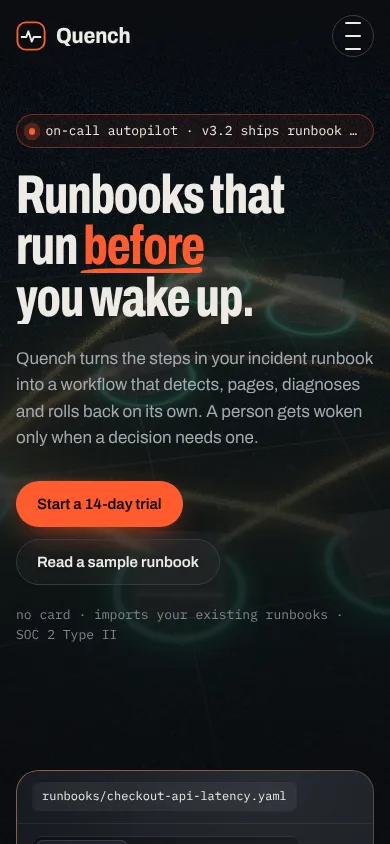
Quench SaaS landing with a live 3D incident map
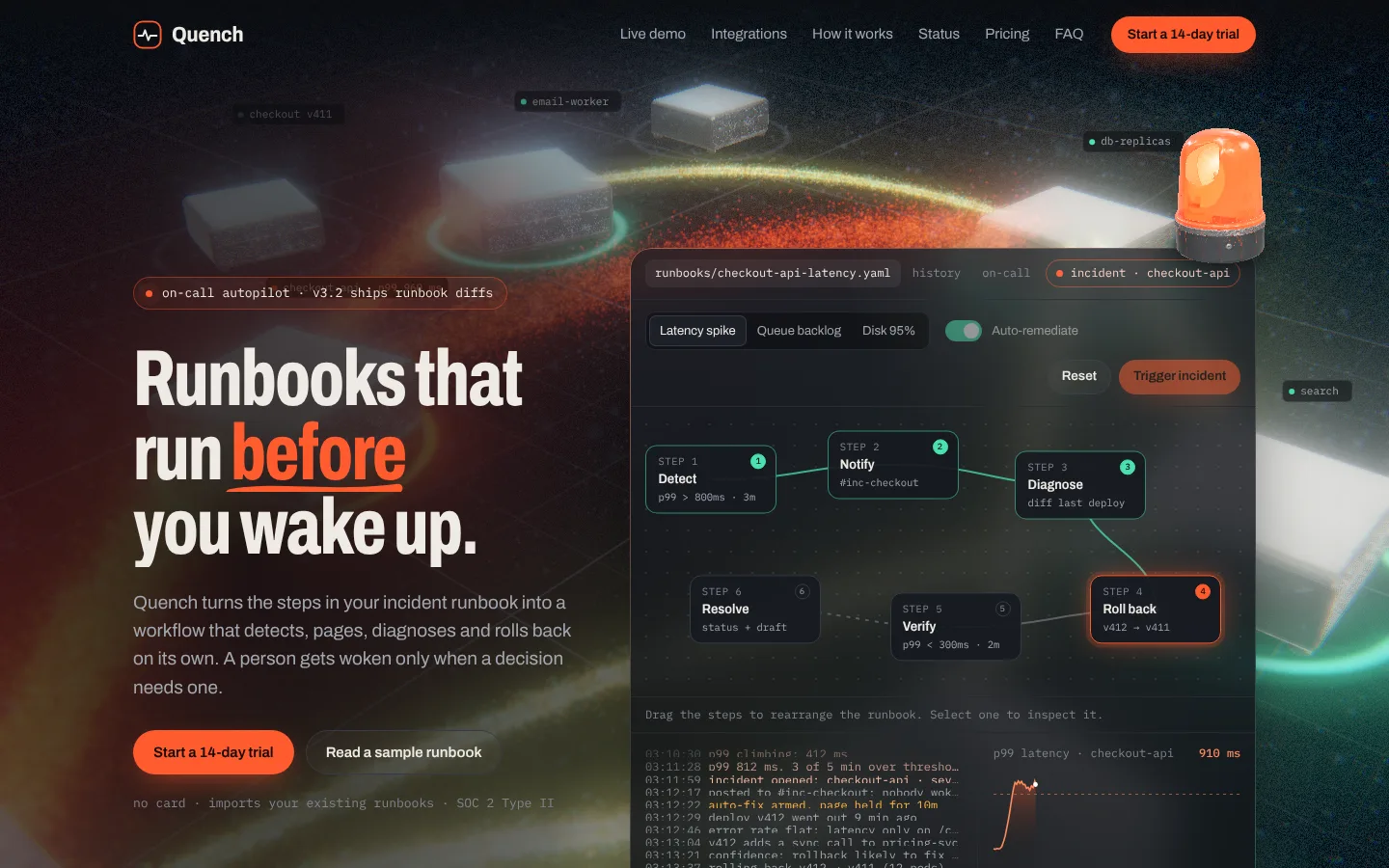
Trigger an incident in a playable runbook and a 3D map of your services reacts: the failing node turns red, the camera flies in and 320k particles of traffic re-route.
What's in the prompt
- A full written spec: layout, tokens, every animation with its numbers, responsive rules
- The complete working code as the reference implementation
- Accessibility, reduced motion and fallbacks already handled
- A “Make it yours” checklist so your site looks like nobody else’s
- Type
- Site
- Built with
- HTML, CSS, JS · three.js 0.170.0
- Prompt size
- 154 KB
- Tags
- saas landing page, devtools, workflow, pricing
- Updated
- 2026-11-26
Use it in three steps
- Copy the prompt with the button above.
- Paste it into your AI (Claude, Claude Code, ChatGPT, Cursor…) and add your edits.
- Launch the single
index.htmlanywhere: Cloudflare Pages, Netlify, GitHub Pages.
About the Quench design
Quench is a landing page for a fictional SaaS that turns incident runbooks into workflows that detect, page, diagnose and roll back on their own. It is set for the night shift: ink-black ground, a signal vermilion for alarms, amber for calm traffic and mint for resolved. Archivo in condensed weights gives the headlines weight, and IBM Plex Mono is used for every label, chip and log line. Behind the page a live 3D system map shows 11 server units with particle traffic flowing between them. The signature is that this map and the hero's product window are one system, so the demo shows the product working rather than describing it.
After an ECG-style preloader folds into the logo, the hero presents a runbook console. The visitor picks a scenario, toggles auto-remediation and triggers an incident: steps light up in turn, a log types itself, a metric chart spikes and recovers, and time to resolve counts up. At the same time the failing node in the 3D map turns red, the camera flies in, and traffic re-routes through a standby node before calming. Scrolling flies the camera through the map. Further down are connector filters, a field manual with a quiet-hours switch, a status board that receives the demo's incident, a pricing estimator, an FAQ and an aurora footer.
Good for
- DevOps and monitoring tools: the simulator shows the product reacting to failure
- Data-pipeline or fraud platforms: the prompt suggests these as re-themes
- Logistics and fleet software: nodes can become depots, trucks or robots
- Utilities and industrial IoT: pumps and pipes can replace the servers
- Any B2B product with a workflow: draggable steps make the flow tangible
How Quench is built
- Working runbook simulator. The hero console runs six steps (Detect → Page → Diagnose → Roll back → Verify → Resolve) for three scenarios, typing a log at about 11ms per character and plotting a metric that spikes and decays; auto-remediation resolves in 4m 12s versus 23m 38s by hand.
- 3D map coupled to the demo. Eleven cloned server GLBs sit on a grid; when an incident fires, the failing node turns red, its edges run hot, the camera flies in, and during the fix traffic drains to .12 flow and re-routes through a standby node.
- Particle traffic in the vertex shader. Up to 320k particles (110k on mobile, 36k on software GPUs) follow 16 curved edges inside a rotating tube, with speed, width and colour driven by uniform arrays for flow and heat, plus depth-of-field sizing.
- ECG preloader that folds into the logo. An SVG trace with ECG blips draws round the viewport on a spring, then at 96.5% the box springs into the header logo's rect while its radius shrinks from 22 to 9.
- Draggable workflow nodes. Step nodes drag with pointer capture (4px threshold, deltas divided by canvas size so the 3D tilt does not skew them) or move with the arrow keys, and their cubic edges redraw live.
Images, video and 3D
Two meshopt GLBs made with an image-to-3D tool: a graphite edge-server unit used for all 11 map nodes and a vermilion warning beacon, plus a 520px beacon poster used as its fallback. Replace them with objects from your own domain (a pump, a truck, a ship's bell) from a 3/4 studio still on light grey, optimised with gltf-transform to under 1 MB.
Build it with Claude
Ask Claude for the full index.html; every UI feature lives in the classic script, so the claude.ai preview can run the simulator even without the 3D map. Trigger each scenario with Auto-remediate on and off, and check the result bar, the status board's 'from the demo' event and the pricing estimator's plan choice at 12 responders and about 18,000 runs.
Claude guide →Build it with Claude Code
Make index.html with assets/server.glb, assets/beacon.glb and assets/beacon-poster.webp, and serve it with npx serve because the GLBs cannot load from file://. Ask Claude Code to confirm the quench:gl event releases the preloader, that the software-GPU tier drops to 36k particles, and that the failing node changes with the scenario (checkout-api, email-worker, db-replicas).
Build it with ChatGPT
Ask ChatGPT to produce the UI script, the 3D map module, the beacon and aurora shaders and the CSS as separate parts, or in canvas, since each is long. A typical follow-up is the simulator timing: check the sim timeline table is used for the clock and metric while the shorter real-millisecond playback values drive the animation.
ChatGPT guide →If it doesn’t work
- The preloader never finishes when WebGL fails: release it on the quench:gl event or after 7 s, and keep all UI in the classic script so the page still works.
- Dragged nodes jump or skew while the console is tilted: divide pointer deltas by the canvas size and freeze the window tilt during a drag.
- Frame rate collapses on laptops without a GPU: detect software rasterisers via WEBGL_debug_renderer_info and switch to the soft tier (fewer particles, DPR .75, quarter-resolution bloom).
Questions about Quench
Does the Quench demo connect to real monitoring tools?
No. The incidents, logs, metrics and status board are simulated in the browser to show how the product would behave. Quench is a fictional product and the page says so.
What can a visitor do in the hero console?
They can pick one of three scenarios, switch auto-remediation on or off, trigger an incident, drag the six workflow steps around (or move them with the keyboard) and rerun in the other mode to compare time to resolve.
Make it yours
This prompt rebuilds one exact design. If everyone ships it unchanged, the sites will look alike. Before you paste it, change these lines so the result is yours. Each change is one edit to the prompt; the structure and the interactions stay intact.
- Brand and offer. Replace Quench and incident response with your own operational product: a data-pipeline monitor, a fraud-review queue, a warehouse robot fleet, a payments-retry engine. Keep six workflow steps, three scenarios and two modes (automated vs. human) so the canvas, log and time-to-resolve comparison still balance.
- Re-theme the signature map. Keep "nodes + flowing particles + one failing node + re-route", but make the world yours: - shipping depots and trucks on a coastline; - pumps and pipes in a water plant; - satellites in orbit (the camera path becomes an orbit); - stores and couriers on a city grid.
Swap the server GLB for one object from that world, and rename the nodes and edges.
- The hero object. Replace the warning beacon with your own "alarm" object that reacts to the incident: a brass ship's bell that swings, a smoke detector that blinks, a traffic light, a lighthouse lamp. Generate a 3/4 studio still on light grey, convert it image-to-3D, and optimise it to under 1 MB.
- Palette. Replace night / signal / amber / mint with your own four roles: ground, alarm, calm, resolved. Keep the alarm hue clearly warmer or more saturated than the calm hue so the heat shift reads, and keep the muted text at ≥ 4.5:1. The paper plate can become any light neutral.
- Type pairing. Swap condensed Archivo + IBM Plex Mono for another condensed or wide display family plus a mono (for example Big Shoulders + JetBrains Mono, or Familjen Grotesk + Space Mono). Keep the mono for every log line and label.
- Scenarios and copy. Rewrite the three scenarios as the three failures your customers actually fear, with real-sounding log lines, metric names, thresholds and fixes. Rewrite headlines in your own voice, stating what the product does ("rolls back the deploy", not "unlock resilience").
- Pricing model. Replace responders × runs with your real two drivers (seats × events, vehicles × routes) and three plans, keeping the "picks the cheaper plan and shows its working" sentence.
- Status board and proof. Rename the six services, the feed events and the three stats to match your domain, and keep the "this is illustrative" note if the numbers are not real.
Tell your AI: "Build exactly as specified, but with these changes: …", then list your edits.