Site · SaaS
Argent Liquid metal that becomes a knowledge graph
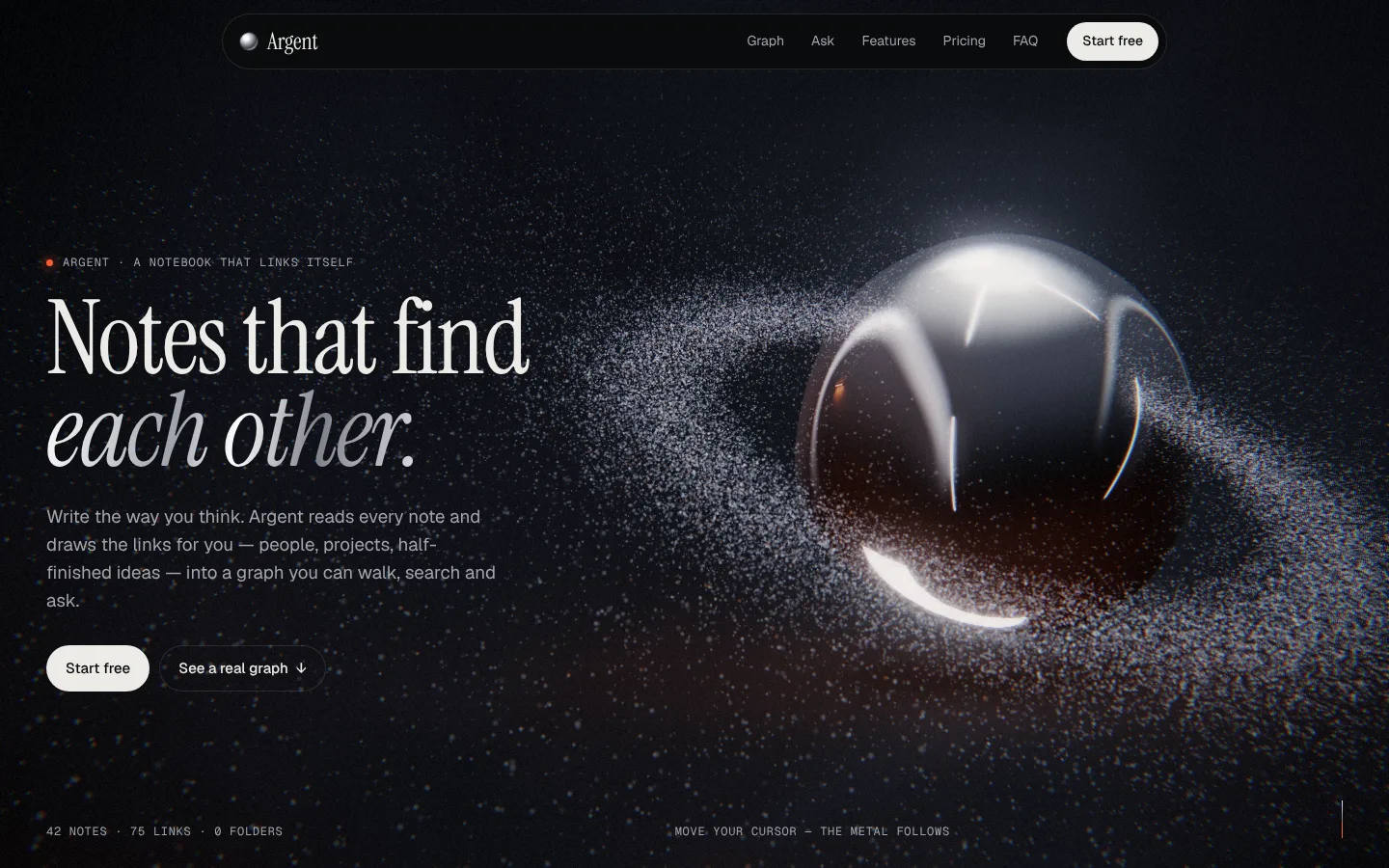
A liquid-metal blob splits into droplets that land on a real 3D graph of your notes, which you can search and explore.
What's in the prompt
- A full written spec: layout, tokens, every animation with its numbers, responsive rules
- The complete working code as the reference implementation
- Accessibility, reduced motion and fallbacks already handled
- A “Make it yours” checklist so your site looks like nobody else’s
- Type
- Site
- Built with
- HTML, CSS, JS · three.js 0.170.0
- Prompt size
- 134 KB
- Tags
- ai saas, raymarching, knowledge graph, three.js
- Updated
- 2026-11-26
Use it in three steps
- Copy the prompt with the button above.
- Paste it into your AI (Claude, Claude Code, ChatGPT, Cursor…) and add your edits.
- Launch the single
index.htmlanywhere: Cloudflare Pages, Netlify, GitHub Pages.
About the Argent design
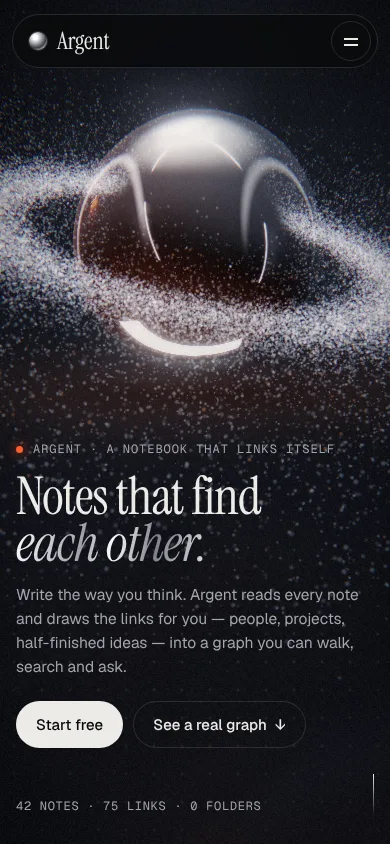
Argent is a landing page for a fictional AI notebook that links your notes for you. Its hero is a raymarched liquid-metal blob on a near-black ground, with one ember accent for paths, focus and highlights. Instrument Serif sets the headlines with an italic second line in a moving silver gradient, Geist runs the interface and Geist Mono the metadata. Later sections switch to warm paper that slides over the dark scene. The signature is one continuous object: the blob shatters into droplets that become the nodes of a real knowledge graph, which shows in one move that scattered notes become a connected map.
The page opens on the blob, which bulges toward the cursor inside a ring of drifting dust. Scrolling flies the camera around it and then through it as it breaks into 14 chrome droplets joined by thin threads that stretch and snap. The droplets land on a 3D graph of 42 notes, smaller leaf notes pop out, and the links draw in as fibres with travelling flashes. Visitors can drag the graph, hover to trace links, open a note in a side card and filter by type. In the Ask section, typing a question lights a path from today's note to the answers. Features, pricing with a seat calculator, an FAQ and a sign-up dialog follow.
Good for
- Note-taking and knowledge tools: the graph is the product demo itself
- CRMs and research platforms: accounts and contacts can be the hubs and leaves
- Online courses: lessons and concepts fit the linked-note model
- AI and search products: the Ask path shows how answers are found
- Developer documentation hubs: topics link like notes and can be searched
How Argent is built
- Raymarched liquid-metal blob. A fullscreen shader smooth-mins 15 spheres (14 hub droplets plus a cursor droplet on a spring with stiffness 110, damping 13) and up to 12 thinning thread capsules, marching up to 72 steps inside a CPU-computed bounding sphere.
- Shatter into graph nodes with no seam. As shatter progress runs from 0 to 1, the blend factor uK falls from .72 to 0 and each droplet travels to its node; the raymarched droplets and the instanced graph spheres share one chrome env/metal GLSL function and one camera maths, so the swap at p ≥ .995 is invisible.
- Scripted scroll camera. A Catmull-Rom path through six keys orbits the blob, dives inside it at t .60 (drawing env(rd)·.35 when the ray starts inside the metal) and returns to the standard pose at z 7, fov 40, so labels and picking stay valid.
- Hashed GPU particle fibres. Up to 640k points store only ring radius, angle and height; edge index, position along the edge and seed are hashed from gl_VertexID, so the hero dust ring morphs into nerve fibres along all 75 links with synapse flash pulses.
- Search that lights a path. Queries are tokenised with synonyms and scored (title +3, body +1, tag +1), then a BFS from 'Today — Nov 26' lights each hop at .24s intervals while off-path nodes dim.
Images, video and 3D
Three small images: studio-env.webp (a 1024×512 equirectangular dark studio used only as the chrome reflection map, about 9 KB), plus notebook.webp and mercury.webp for two feature cards. The blob, graph and particles are all code. Generate a new 2:1 environment panorama with an AI image tool or render one in Blender to change the metal's look, and keep it under 30 KB.
Build it with Claude
Ask Claude for the complete index.html; even if the preview cannot run WebGL or reach the CDN, the SVG goo-blob fallback shares the labels, picking, filters and search code. Type a question such as 'why do customers churn' and check the results show a trail from Today with matched words marked, and that the seat stepper gives $720 billed yearly for 5 Team seats.
Claude guide →Build it with Claude Code
Put studio-env.webp, notebook.webp and mercury.webp in assets/ and serve with npx serve, since the env map is loaded as a texture. Ask Claude Code to confirm the data yields 42 notes and 75 de-duplicated links, that ?nogl renders the SVG graph, and that the canvas stops drawing once the paper features sheet covers the viewport.
Build it with ChatGPT
This prompt is close to 30 KB and very dense, so ask ChatGPT to work section by section in canvas: the classic UI script, the data and force layout, the raymarch shader, the graph and particles, then the composer. The 42-note data is described rather than listed in full, so ask it to write all 42 bodies and check the hub/leaf counts and link total before moving on.
ChatGPT guide →If it doesn’t work
- A visible pop when droplets become graph nodes: both passes must call the same env() and metal() functions and read the same CPU-computed world positions; any separate material breaks the hand-off.
- The dark background turns grey after post-processing: set outputColorSpace to LinearSRGBColorSpace and let the grade pass apply ACES at exposure 1.12.
- The graph layout changes on every load: run the force layout with the seeded mulberry32 PRNG (seed 11) for exactly 520 iterations.
Questions about Argent
Is the Argent knowledge graph interactive or just an animation?
It is interactive. You can drag to orbit, hover to trace a note's links, click or press Enter to open a note card, filter by type, and type a question to see a path light up to the matching notes. Every node is also a real button for keyboard users.
Can I use my own notes or data in the graph?
Yes. The prompt suggests 12 to 16 hubs, which become the droplets, and 25 to 35 leaves, each linked to at least one hub. Rewrite the synonym map, the suggestion chips and the demo query to match your data.
Make it yours
This prompt rebuilds one exact design. If everyone ships it unchanged, the sites will look alike. Before you paste it, change these lines so the result is yours. Each change is one edit to the prompt; the structure and the interactions stay intact.
- Brand and graph data. Replace Argent and the 42 notes with your own product's world: a reading app's books and authors, a CRM's accounts and contacts, a course's lessons and concepts. Keep 12–16 hubs (they are the droplets) and 25–35 leaves. Keep every leaf linked to at least one hub, and make the BFS root a note that a first-time visitor understands, such as "Today" or "Start here". Rewrite the four Ask suggestions, the synonym map and the auto-typed demo query to match questions your users ask.
- The camera journey. Keep the 6-key path but re-block it for your object: a slow crane down from above, a dolly through the ring instead of the blob, or a 360° orbit before the dive. Keep the first and last keys at the standard pose.
- The material of the blob. The liquid metal is the signature. Re-theme it by changing only
env()andmetal(): molten glass (tint the env teal, add.35transmission-style brightening at grazing angles), black ink (env×.25, a single white softbox, no strips), gold (multiply by(1, .78, .42), a warmer floor bounce), or soap bubble (add a thin-film hue fromfract(F·3)). The nodes use the same function, so the hand-off stays seamless. - The split choreography. Keep the droplets-to-nodes mapping and change how they travel: change the stagger (
1.3p − .3·stag) to a ripple ordered by distance from the cursor, swap the threads for none (cleaner) or for every hub edge (stringier), or slow the split toscrollY/1.2vhfor a more cinematic hero. - Palette. Replace
--ink,--paperand--emberwith your brand colours, and the molten tint (1, .36, .16) with your accent in linear RGB. Keep--mutedat ≥ 4.5:1 contrast on--ink, and--ink-mutedat ≥ 4.5:1 on--paper. - Type pairing. Swap Instrument Serif + Geist + Geist Mono for another trio, for example Fraunces + Inter Tight + JetBrains Mono, or Newsreader + Manrope + IBM Plex Mono. Keep an italic display face, because the italic second line of each headline is part of the voice.
- Images. Regenerate
studio-env.webpas an equirectangular room that fits your material (a sunset window for gold, a neon alley for glass) at 2:1, compressed under 30 KB. Replacenotebook.webpandmercury.webpwith two photos from your product's world in the same low-key light. - Copy. Rewrite every headline in your own voice and say concretely what the product does ("links your call notes to the deal", not "supercharge your knowledge").
Tell your AI: "Build exactly as specified, but with these changes: …", then list your edits.