Site · Product launch
Earmark App launch with a live 3D phone in a rendered studio
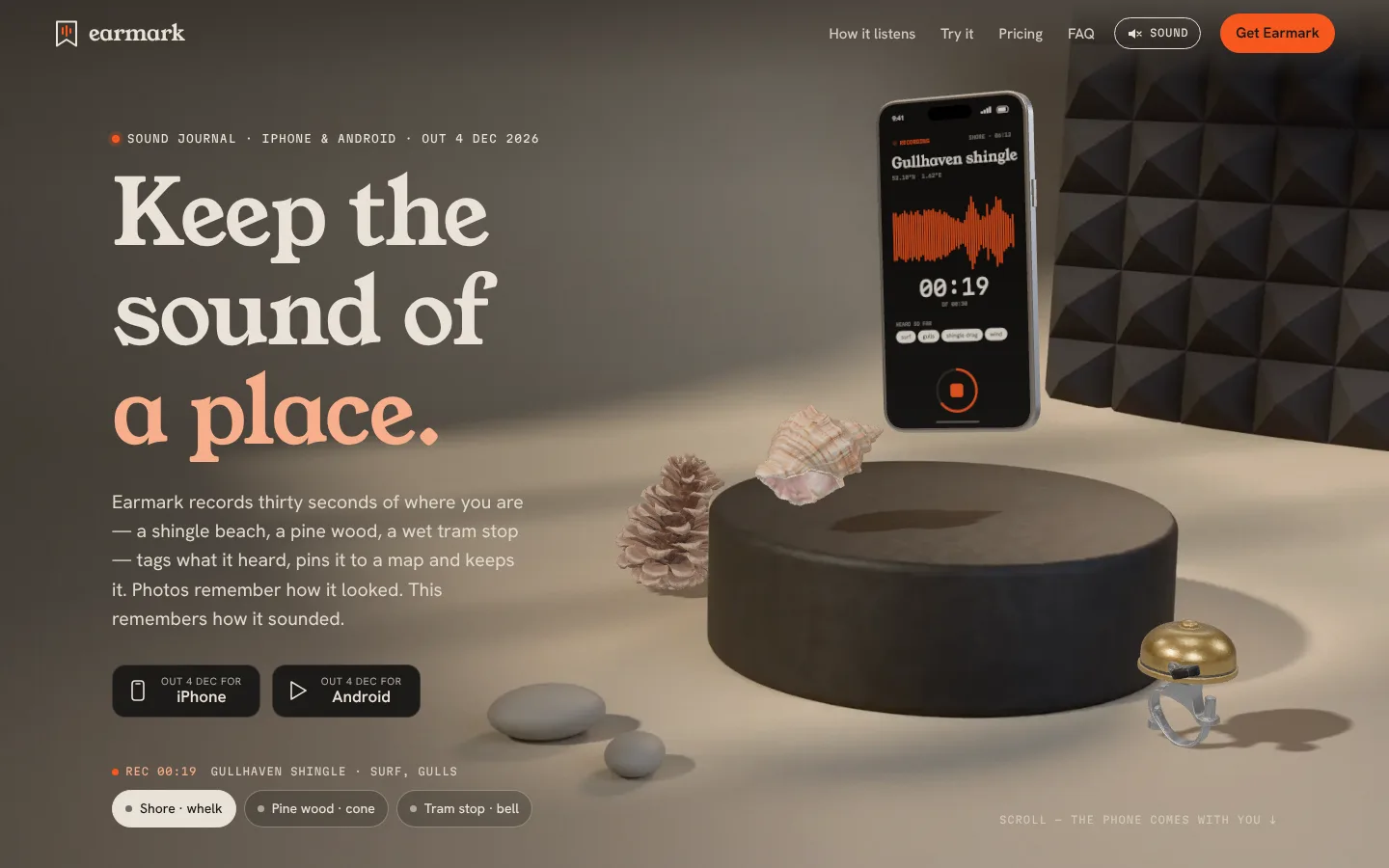
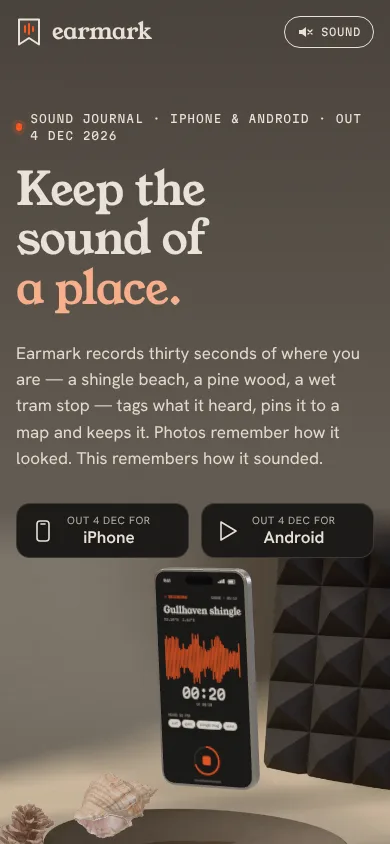
A 3D phone running the real app floats in a Blender-rendered studio with scanned props, flies between sections as you scroll, and the recorder demo actually works.
What's in the prompt
- A full written spec: layout, tokens, every animation with its numbers, responsive rules
- The complete working code as the reference implementation
- Accessibility, reduced motion and fallbacks already handled
- A “Make it yours” checklist so your site looks like nobody else’s
- Type
- Site
- Built with
- HTML, CSS, JS · three.js 0.170.0
- Prompt size
- 130 KB
- Tags
- app landing page, three.js, mobile app, product launch
- Updated
- 2026-11-26
Use it in three steps
- Copy the prompt with the button above.
- Paste it into your AI (Claude, Claude Code, ChatGPT, Cursor…) and add your edits.
- Launch the single
index.htmlanywhere: Cloudflare Pages, Netlify, GitHub Pages.
About the Earmark design
Earmark is the launch page for a fictional sound-journal app that records thirty seconds of a place, tags what it heard, pins it to a map and keeps it. The palette is bone and ink with a warm wall colour sampled from the hero render and one record red-orange for actions. Young Serif sets the display lines, Hanken Grotesk the body and Martian Mono every readout. The hero is a Blender Cycles studio render with live three.js objects composited into it: a titanium phone over a basalt plinth and three GLB props (a whelk shell, a pine cone and a brass bicycle bell) that cast shadows onto the render. The signature is that the phone's screen is a live canvas running the app's interface.
As the visitor scrolls, the phone leaves the plinth and flies between sections, making a full turn whenever its screen changes and swapping the screen while its back faces the viewer. In Try it, the visitor picks one of three places and presses record: a synthesized field recording plays without the microphone, the waveform draws on the phone, tags appear, and the clip can be named and saved to a journal. Field notes, pricing with an odometer, an FAQ and a launch form follow.
Good for
- App launches: the 3D phone carries real, working screens rather than a static mock-up
- Audio, camera or scanning apps: the demo records, tags and saves entirely in the browser
- Hardware with a companion app: the three props can stand for the product's three modes
- Pre-launch waitlists: store-style badges open a notify dialog with email validation
- Freemium products: two unequal plans and a one-off strip sit beside the phone
How Earmark is built
- Live objects in a rendered plate. The scene camera copies the Blender camera (50 mm lens, vertical FOV about 22.9°) and calls setViewOffset from the plate's layout every frame, so the props stay glued to the image; ShadowMaterial at .42 catches their shadows and a depth-only cylinder hides the pine cone behind the rendered plinth.
- Phone screen as a canvas texture. A 600 × 1277 CanvasTexture on the screen shape draws each app screen (record, tag, map, listen, demo, plan and journal) at up to 30 fps only when it changes, and a raycast to UVs makes the 3D screen's record and Keep it areas tappable.
- Slot-based flight with flips. Each section has an invisible .slot box; t = clamp((0.92H − sectionTop)/0.72H), eased in-out cubic, mixes the phone's pose toward the next slot with sin(π·t)·1.1 rad of turn, and every screen change is a 2π turn over 900 ms.
- Synthesized field recordings. Web Audio builds three places from noise and oscillators (shore surf and gull chirps, forest birdsong and a woodpecker, a tram rumble with wire hum and bell partials), and the analyser's RMS × 3.2 drives the meter, the bars on the phone and the floating prop.
- Props that react. Hovering a GLB through a raycast wobbles it ±.08 rad; clicking it or its chip fires a hop spring (k 60, damping 7) with one full spin over about .8 s and switches the hero phone to that place.
Images, video and 3D
A 1920×1080 Cycles studio plate (oat sweep, basalt plinth, foam panel, two pebbles) and a matching poster with the phone rendered in, three meshopt GLB props made with an image-to-3D tool (shell, cone and bell, about 1.85 MB together with 1024px WebP textures), and three 1000×750 film-look place photos. To make your own, re-render the plate with the same camera numbers so live objects still line up, and generate each prop from a clean product photo.
Build it with Claude
Ask Claude for the full index.html. three.js is loaded with dynamic import(), so if it fails the page still works and the demo slot holds the live app canvas inside a CSS phone. In the preview, pick a place, press record and check that tags appear about every 1.4 s, that recording stops at 8 s, that a custom tag rejects duplicates, and that saving raises the free-recordings quota by one.
Claude guide →Build it with Claude Code
Put studio-plate.webp, studio-poster.webp, shell.glb, cone.glb, bell.glb and the three place photos in assets/ and serve with python3 -m http.server so the GLBs load. Ask Claude Code to scroll headlessly and confirm the phone docks in each slot at 1440 and 768, that it flies away under 860px where the pricing slot is hidden, and that a forced WebGL failure sets html.no-webgl and shows the poster.
Build it with ChatGPT
Ask ChatGPT for the page in parts: the HTML and CSS, the app-screen canvas and recorder logic, the Web Audio recipes, then the three.js scenes, or work in canvas. A common follow-up is alignment: check that it uses the Blender camera numbers and setViewOffset rather than an eyeballed camera, or the props will float off the plinth.
ChatGPT guide →If it doesn’t work
- The props slide off the plinth as the hero scrolls: call setViewOffset with the plate's current position every frame, not only on resize.
- The pine cone draws in front of the rendered stone: add the invisible depth-only cylinder (colorWrite false, renderOrder −1) where the plinth stands in the render.
- No sound plays: create the AudioContext on the first user gesture and keep the master gain at 0 until the Sound toggle is on, while the analyser keeps running for the visuals.
Questions about Earmark
Does the Earmark demo use my microphone?
No. The recorder plays a sound synthesized in the browser for the chosen place and analyses that, so the page never asks for microphone access. Sound stays muted until the visitor turns on the Sound toggle.
Is Earmark a real app?
No. The footer says it is a fictional app made for a design demo, and the field notes section says its testers, quotes and numbers are fictional. The store-style badges open a notify dialog rather than a real store listing.
Make it yours
This prompt rebuilds one exact design. If everyone ships it unchanged, the sites will look alike. Change these lines before you paste it; the structure and interactions stay intact.
- App and offer. Swap Earmark for your own app (a plant-care camera, a run logger, a recipe scanner…). Keep a single verb-led promise, four "How" steps, one demo flow with 3–4 steps and two plans plus one one-off strip so the columns stay balanced.
- The studio set. Re-render the plate for your world with the same camera numbers (so the live objects still line up): a potting bench instead of a plinth, a kitchen counter, a running track kerb. Keep one hero surface at roughly the same place in frame and one window-light streak.
- The props. Replace shell / cone / bell with three objects that stand for your app's three "modes" (pot / watering can / seed packet; shoe / bottle / watch). Generate each from a clean product photo with image→3D, compress with meshopt + WebP ≤ 1 MB, and keep one on the hero surface, one partly behind it, one on the floor.
- The phone screens. Redraw the canvas screens for your app but keep the rule that each section owns one screen and every change is a full-turn flip. Keep the record/scan button and live data on the demo screen.
- Palette. Replace
--wallwith a colour sampled from your render's back wall,--signalwith your action colour, and the bone/ink pair with your neutrals. Keep bone-on-wall and muted-on-bone at ≥ 4.5:1. - Type. Swap Young Serif + Hanken Grotesk + Martian Mono for another warm display face, a plain grotesk and a mono with character. Keep the mono for every readout so the "instrument" feel survives.
- Sound. Rewrite the three synth recipes for your app's moments (a watering can pour, a shutter, a heartbeat), or drop audio and keep the analyser driven by a procedural envelope.
- Copy voice. Specific and physical: "Go and stand somewhere for thirty seconds", not "Unlock your potential". Keep the fictional-demo disclaimer if your people and numbers are invented.
Tell your AI: "Build exactly as specified, but with these changes: …", then list your edits.