✦ Members Site · Product launch
Grainfield Phone app promo page with a live 3D viewfinder
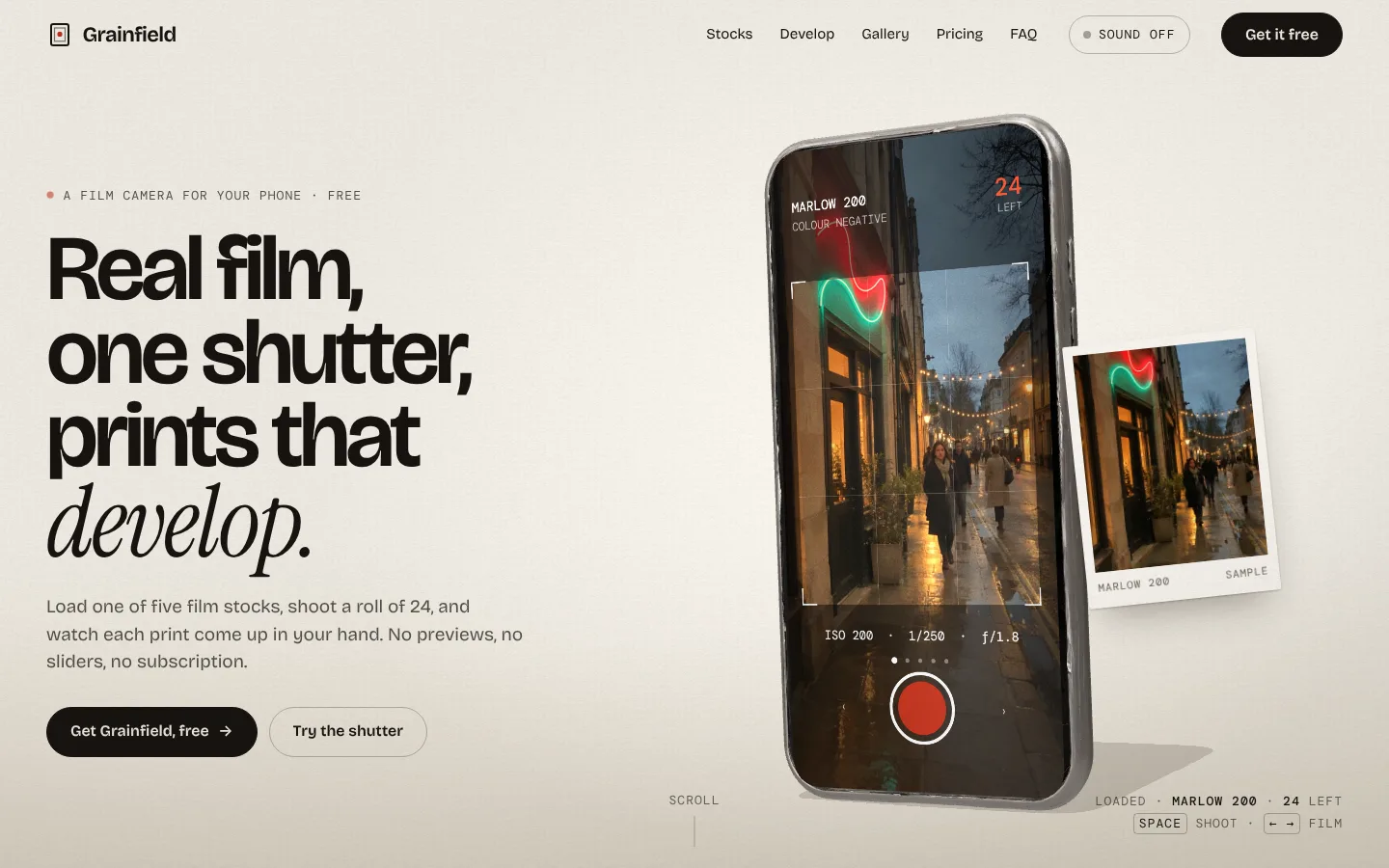
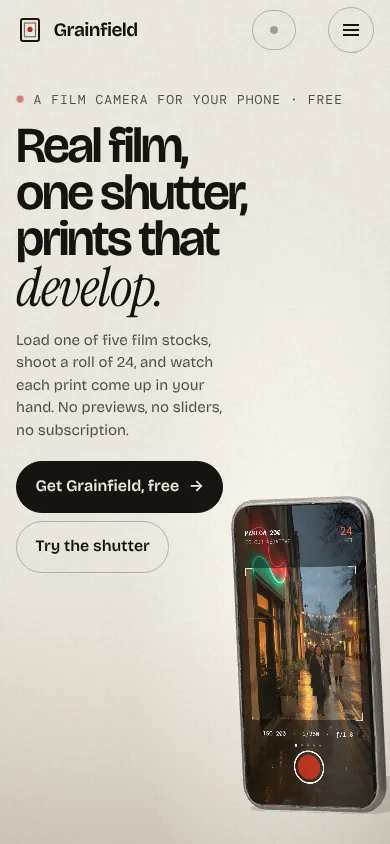
A launch page for a film camera app. A real 3D phone runs a live viewfinder: a street film plays through five film-stock shaders, the shutter captures the frame, and a print slides out and develops in four seconds.
Unlock free with your emailPrompt 159 KB · code .zip 13.3 MB
Members
Unlock the prompt, demo and code
Free with your email. We send a confirm link; it unlocks every Members template on this browser.
Check your inbox
We sent the unlock link to . Open it in this browser and every Members template unlocks.
Nothing after a few minutes? Look in spam or promotions. Wrong address?
Unlocked on this browser
What's in the prompt
- A full written spec: layout, tokens, every animation with its numbers, responsive rules
- The complete working code as the reference implementation, also as a ready-to-run .zip with every image, video and 3D model
- Accessibility, reduced motion and fallbacks already handled
- A “Make it yours” checklist so your site looks like nobody else’s
- Type
- Site
- Built with
- HTML, CSS, JS · three.js 0.170.0
- Prompt size
- 159 KB
- Tags
- app landing page, three.js, 3D phone, WebGL shader, interactive demo
- Updated
- 2026-11-28
Use it in three steps
- Unlock it free with your email, then copy the prompt.
- Paste it into your AI (Claude, Claude Code, ChatGPT, Cursor…) and add your edits.
- Launch the single
index.htmlanywhere: Cloudflare Pages, Netlify, GitHub Pages.
About the Grainfield design
Grainfield is a fictional film camera app for phones from a four-person studio in Porto, launching free with a one-time Darkroom upgrade. The page is a warm paper darkroom under one soft key light, with a single safelight red kept for the shutter, counters and the develop timer. Bricolage Grotesque sets the words, DM Mono the labels and counters, and an Instrument Serif italic takes one word per heading.
The signature is a pinned stage around a real 3D phone (image-to-3D from a generated product shot, no logos). Its screen is a live viewfinder: a generated dusk street film plays at native rate and runs through a film-stock shader with a tone curve, colour shifts, halation round the lights, ISO-sized grain, vignette and gate weave. Five invented stocks ease into each other by swipe, arrow keys, number keys or the list. The shutter (button, Space, Enter or a tap on the screen) sweeps a focal-plane curtain, captures the frame exactly as graded, and a print flies out and develops from milky grey to full colour in four seconds. A 24-frame counter and negative strip count down, and a finished roll opens a contact sheet. Below come a darkroom section, a drag-to-compare gallery, a data sheet, beta reviews, pricing with a currency switch, an FAQ and a download block with a real QR code and the roll you shot on the page.
Good for
- Mobile app launches that can show the product working instead of screenshots
- Camera, photo and video-editing apps, filters and presets
- Any app whose core is a visual transform you can run live in a shader
- Pre-launch pages that collect emails and show a release date
How Grainfield is built
- A live screen inside a 3D phone. The street film is a VideoTexture drawn through the film shader into a render target, and that target is the phone screen's map. The app UI (stock name, ISO, counter, shutter) is drawn on a canvas and composed on top, so the screen reads as a real app.
- Film stocks as uniforms. Each stock is a set of numbers: tone-curve toe and shoulder, channel cross-process, halation strength and radius, grain size from ISO, vignette. Switching springs every uniform to the next stock, so looks blend instead of cutting.
- Capture what you see. The shutter reads the graded render target into a canvas, so the print holds exactly the frame and look on screen. Development runs from milky grey to full contrast over four seconds; reduced motion shows the finished print at once.
- One shader for live and still. The gallery prints and the no-WebGL stills were rendered offline by the same shader, so the page without WebGL shows the same five looks and still lets you switch stock, shoot and fill a roll.
- A slow load is not a failure. If the scene is not ready in 9 s the designed still shows while loading continues, and the live phone takes over when it arrives; only a real WebGL or CDN error is final.
Images, video and 3D
The download includes everything the page uses (about 14 MB): a 1.3 MB meshopt GLB phone plus a 0.7 MB version for phones, made with image-to-3D from a generated product shot; a 7-second seamless street film loop at 720p and 540p in AV1 and H.264; six gallery photographs as graded and original pairs; the darkroom still; and per-stock fallback stills, all AVIF and WebP. prompt.md lists the exact generation prompts and encode settings.
Build it with Claude
Ask Claude for the full index.html in one pass with the assets folder beside it. Check each of the five stocks on the phone screen, press the shutter a few times and watch the counter, the negative strip and the print, then shoot to the end of the roll and open the contact sheet. Finally check a phone-width view and the page with three.js blocked.
Claude guide →Build it with Claude Code
Serve the folder with python3 -m http.server and have Claude Code screenshot the stage at each stock at 1440 and 390, script the shutter to 24 frames, then run with reduced motion, with jsDelivr blocked (stills and a red banner), and with the GLB delayed 14 s to confirm the live phone takes over after the still.
Build it with ChatGPT
Ask for the page in parts: the shell, tokens and loader; the stage markup and canvas UI; the three.js module (phone, screen render target, film shader, stocks); the shutter, print and roll logic; then the sections below. Check that the capture reads the graded target, not the raw video, or prints will not match the screen.
ChatGPT guide →If it doesn’t work
- Reading the raw video for a capture gives an ungraded print; read the render target the screen shows.
- Spring the stock uniforms, not the video time: seeking or scrubbing compressed video stutters.
- A fallback on a fixed timer can lock a slow phone out of the 3D for good; keep loading and hand over when ready.
- Grain at full resolution shimmers on high-DPR screens; size it from ISO in screen pixels and cap the pixel ratio.
Questions about Grainfield
Do I need a 3D model?
The download includes the phone GLB. To use your own device, export a GLB with a separate flat screen mesh, or keep the model and add a screen plane aligned to its glass.
Can I show my real app instead of a camera?
Yes. Replace the video and shader pass with your app's UI drawn on the screen canvas, or a screen recording as the video texture; the phone, light and stage stay the same.
What happens without WebGL?
A CSS phone shows pre-rendered stills of each stock. Stock switching, the shutter, prints, the roll and the contact sheet all still work, and a red banner says the 3D library could not load.
Does it name a real phone or store?
No. The phone has no logos, and the download block says both phone stores without store badges, so it is safe to adapt.
Make it yours
This prompt rebuilds one exact design. If everyone ships it unchanged, the sites will look alike. Keep the structure — one pinned stage with the live screen, the stock springs, the shutter → print → roll loop, the darkroom section and the fallbacks — and change these:
- The product and the brand. Swap Grainfield for your own camera, scanner, filter or editing app; keep a "five presets, one action, one result that takes time" loop so the dock, counter and print slot still make sense. Keep 24 (or any number from 12 to 36) frames so the strip grid ends cleanly.
- The looks. Rewrite the five stocks as your own presets — e.g. five dye-sublimation papers, five cyanotype exposures, five expired-film moods, five lo-fi CCD sensors. Change only the stock table (lift/gamma/gain, S-curve, warm, halation, grain, vignette, mono, weave) and the ISO → grain size line; the shader and springs stay.
- What develops. Replace the instant-print development with your own reveal: a cyanotype turning from yellow-green to Prussian blue, a Polaroid with a white border that dries, a darkroom print under red light, a thermal receipt printing line by line. Change only the filter keyframes, the veil colour and
DEVELOP_MS(keep 3–6 s). - The viewfinder film. Generate your own 8 s handheld scene (a market at noon, a seafront at dawn, a gig under coloured lights). Keep strong point lights in frame so the halation shows, and keep the loop dissolve.
- Palette. Keep one ground, one ink and one accent with one job. Paper
#eeeae2→ cool fixer grey#e6e8e6, or a dark variant with darkroom ground and bone ink; the accent must stay ≥ 4.5:1 on the ground. - Type. Swap Bricolage Grotesque for another opsz grotesk (Instrument Sans, Archivo) and keep a mono for counters and edge codes; keep the single serif-italic word per heading or drop it entirely.
- The phone. Generate your own logo-free device (a compact camera, a rangefinder-style phone grip) through the same image-to-3D route, then re-measure the screen plane fractions.
- Copy. Keep it dry and specific: numbers, plain promises, no "unlock" or "elevate". Rewrite reviews, FAQs and the data sheet in your product's facts.
Tell your AI: "Build exactly as specified, but with these changes: …", then list your edits.
Commissions
Want Grainfield for your brand?
We build it for you: your story, your copy, motion made for your brand, live on your domain. Two projects a month, so each one gets the same care as this template.
- A cinematic site made for your brand, not a reskin
- Original motion and imagery made for your story
- Fast on phones, accessible, yours to keep
Thank you. We have it.
We read every inquiry ourselves and reply from hello@copytheprompt.design within two working days. Add that address to your contacts so the reply doesn’t land in spam.