Section · Social proof
Paceline Customer stories rail with filters and a voice note
A testimonial rail with momentum drag, a progress scrubber, highlighted key phrases, filter chips and a rating summary.
What's in the prompt
- A full written spec: layout, tokens, every animation with its numbers, responsive rules
- The complete working code as the reference implementation
- Accessibility, reduced motion and fallbacks already handled
- A “Make it yours” checklist so your site looks like nobody else’s
- Type
- Section
- Built with
- HTML, CSS, JS · no libraries
- Prompt size
- 76 KB
- Tags
- testimonials, carousel, reviews, social proof
- Updated
- 2026-11-26
Use it in three steps
- Copy the prompt with the button above.
- Paste it into your AI (Claude, Claude Code, ChatGPT, Cursor…) and add your edits.
- Launch the single
index.htmlanywhere: Cloudflare Pages, Netlify, GitHub Pages.
About the Paceline design
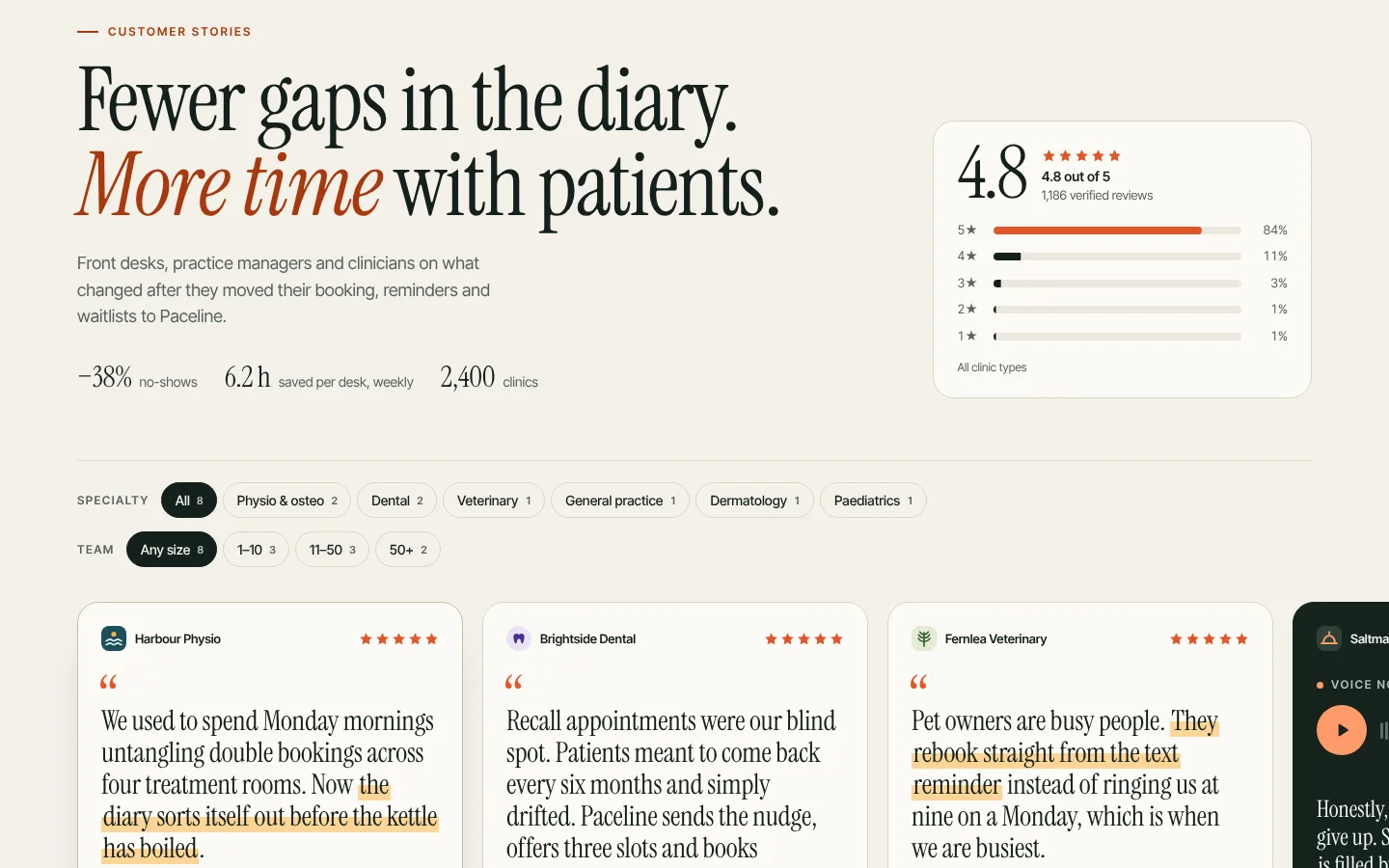
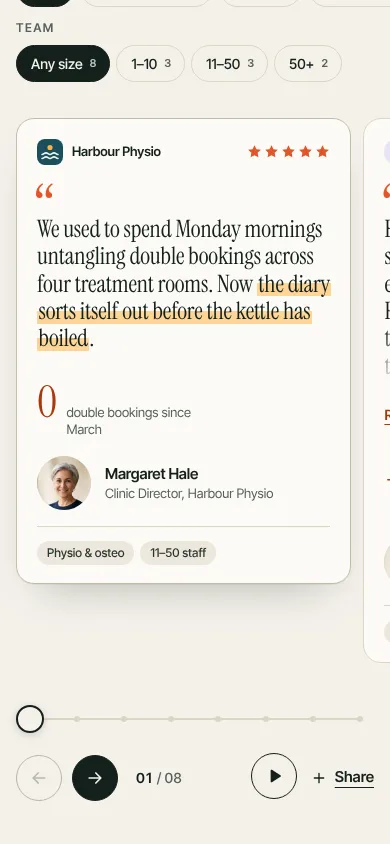
Paceline's customer-stories section is written for a fictional clinic-scheduling tool, so it reads like a calm health-sector page rather than a loud carousel. A paper-coloured ground, deep green-black ink and one orange accent for stars and results keep it warm, with a pale highlighter yellow reserved for the key phrase in each quote. Instrument Serif makes the quotes and headline feel editorial, and Inter Tight handles chips, meta and controls. The signature is a story rail that you can drag with momentum, mirrored by a scrubber with one tick per story, so visitors can skim eight stories quickly or jump straight to one.
A visitor sees the headline next to a rating summary card with an average of 4.8 and five distribution bars. Below are Specialty and Team size filter chips with live counts; choosing one re-flows the cards and re-counts the rating summary. Each card shows a clinic mark, a star rating, a quote whose key phrase draws its highlighter when the card comes into view, and a large result figure. One dark card is a voice note with a waveform and a word-by-word transcript. The rail advances every seven seconds with a visible pause button, and Share your story opens a validated form.
Good for
- B2B SaaS: result figures under each quote show outcomes, not just praise
- Healthcare and clinic tools: specialty filters let buyers find peers like them
- Agencies: case-study quotes with one number each fit the card format
- Service businesses with many segments: cross-filter counts keep segments honest
- Course or coaching programmes: the voice-note card can carry a student's own words
How Paceline is built
- Momentum mouse drag on a snap rail. Touch scrolls natively; a mouse or pen drag turns snap off, keeps the last 90ms of samples, projects scrollLeft − v × 260 to choose a card, and settles over clamp(420, 380 + |v| × 120, 900) ms.
- Draggable progress scrubber. A role=slider track has one tick per story at that card's snap position; dragging maps x linearly onto scrollLeft, and release settles on the nearest card.
- Highlighter swipe on view. An IntersectionObserver with threshold .82 marks a card seen, and the key phrase's mark background grows from 0% to 100% width over 900ms after a 150ms delay.
- FLIP filtering with recounted summary. Specialty and team-size chips fade leaving cards, animate staying ones from their old position over 560ms and stagger new ones in at 80 + i × 55 ms, while the rating average counts up and the bars re-scale for that specialty.
- Voice-note card. A 46-bar waveform playhead runs over 21s with a word-by-word transcript; where speechSynthesis exists the text is read aloud at rate .98 and word boundary events drive the highlight.
Images, video and 3D
Six 160×160 WebP headshots (about 3 KB each) in matching window light; two people use serif monogram circles instead, and the eight clinic marks are inline SVG. Use real customer photos with their permission, or generate a fictional set with an AI image generator using one identical lighting and backdrop description, then crop all to the same head size.
Build it with Claude
Ask Claude for the single index.html; there are no libraries, so the preview runs everything except your local headshots. Check the 7s auto-advance pauses when you hover or focus the rail, that the highlighter draws only once a card is mostly in view, and that the voice note plays with the transcript lighting word by word.
Claude guide →Build it with Claude Code
Create index.html plus an assets/ folder with the six headshot WebPs and have Claude Code build it from the prompt. No fetch or model loading is involved, so file:// works, but ask it to verify scrollWidth equals innerWidth at 390, 768 and 1440 and to exercise the filter empty state and the dialog's 20-character message rule.
Claude Code guide →Build it with ChatGPT
Ask ChatGPT to write it in parts (styles, markup and data arrays, then the drag, scrubber and autoplay logic) or in canvas. Follow up on autoplay: check that it really holds in every listed case, including off-screen, hidden tab, voice playback and open dialog, and that announcements only fire after user navigation.
ChatGPT guide →If it doesn’t work
- The last card can never snap to the start: add the trailing spacer element and size it so the final card can reach the left edge.
- A drag ends by opening a card's link or button: suppress the click event that follows a drag of more than 5px.
- Auto-advance keeps moving while someone reads or listens: it must pause on hover, focus, voice playback, the open dialog and when under 35% of the rail is visible, to meet WCAG 2.2.2.
Questions about Paceline
Does the Paceline voice note need an audio file?
No. It reads the transcript aloud with the browser's speechSynthesis where available, and the waveform and word highlights still play visually where it is not. You could swap in a real recording if you have one.
How many customer stories should I use?
The prompt suggests 6 to 10. That keeps the scrubber ticks readable and stops the cross-filter counts from leaving every chip empty.
Make it yours
This prompt rebuilds one exact design. If everyone ships it unchanged, the sites will look alike. Before you paste it, change these lines so the result is yours. Each change is one edit to the prompt; the structure and the interactions stay intact.
- Brand and audience. Swap Paceline and its clinics for your own product and the people who use it, such as a field-service app for plumbers, accounting software for agencies, or a booking tool for salons. Rewrite
INDas your 4–7 customer segments andSIZEas 3 team sizes. Keep 6–10 stories so the scrubber ticks stay readable and the cross-filter counts never leave every chip empty. - The highlighter. The key phrase that draws itself is the signature. Re-theme the
markand keep the trigger (82% in view) and the 900ms draw: a hand-drawn SVG underline squiggle that strokes in withstroke-dashoffset, a solid ink box that wipes in behind inverted text, a circled number, or a strike-through on the "before" and a highlight on the "after". - The voice card. Turn it into another kind of story: a 6-second "screen recording" card with a scrubbable frame strip, a handwritten note card that writes itself in, or a before/after metric card where the bars race. Keep the play button, the progress and the pause-on-play rule for auto-advance.
- Palette. Replace paper, ink, accent, accent-ink, highlighter and the night tokens with your brand colours. Keep muted text and accent-ink at ≥ 4.5:1 on paper, and keep the highlighter pale enough that ink text over it stays ≥ 4.5:1.
- Type pairing. Swap Instrument Serif + Inter Tight for another pairing, such as Fraunces + Geist, Newsreader + Manrope, or a grotesk-only pairing (Bricolage Grotesque + Inter) if your brand is not editorial. Re-tune the quote size so the longest short quote fits in 7 lines.
- Photos. Replace the six
assets/*.webpheadshots with your real customers (with their permission), or generate new fictional ones in one batch with an identical prompt tail: same light direction, backdrop and lens. Then crop all of them to the same head size. Redraw the eight clinic marks as simple 26px SVGs of your customers' logos only if you have the rights. - Results and copy. Replace each
resultwith a real, specific number your customer would sign off on, and rewrite the quotes in their own words. Use one concrete detail per quote ("before the kettle has boiled") rather than adjectives ("amazing", "seamless").
Tell your AI: "Build exactly as specified, but with these changes: …", then list your edits.