Site · Portfolio
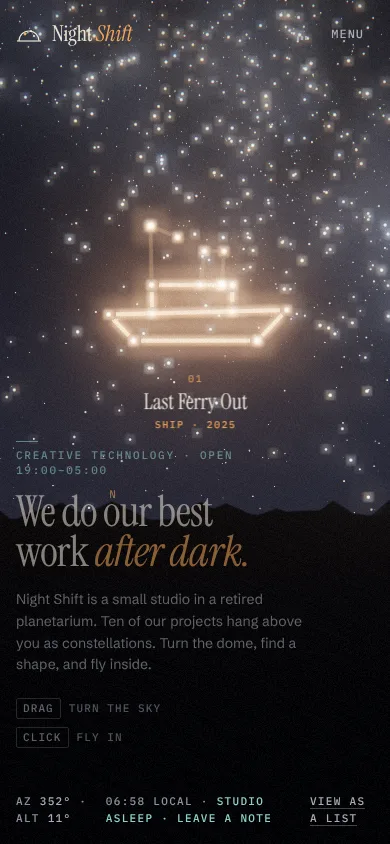
Night Shift Studio portfolio as a dome of constellations
A creative studio site where each project is a constellation in a planetarium dome; click a star to warp into the work.
What's in the prompt
- A full written spec: layout, tokens, every animation with its numbers, responsive rules
- The complete working code as the reference implementation, also as a ready-to-run .zip with every image, video and 3D model
- Accessibility, reduced motion and fallbacks already handled
- A “Make it yours” checklist so your site looks like nobody else’s
- Type
- Site
- Built with
- HTML, CSS, JS · three.js 0.170.0
- Prompt size
- 160 KB
- Tags
- creative studio, webgl portfolio, fluid simulation, three.js
- Updated
- 2026-11-26
Use it in three steps
- Copy the prompt with the button above.
- Paste it into your AI (Claude, Claude Code, ChatGPT, Cursor…) and add your edits.
- Launch the single
index.htmlanywhere: Cloudflare Pages, Netlify, GitHub Pages.
About the Night Shift design
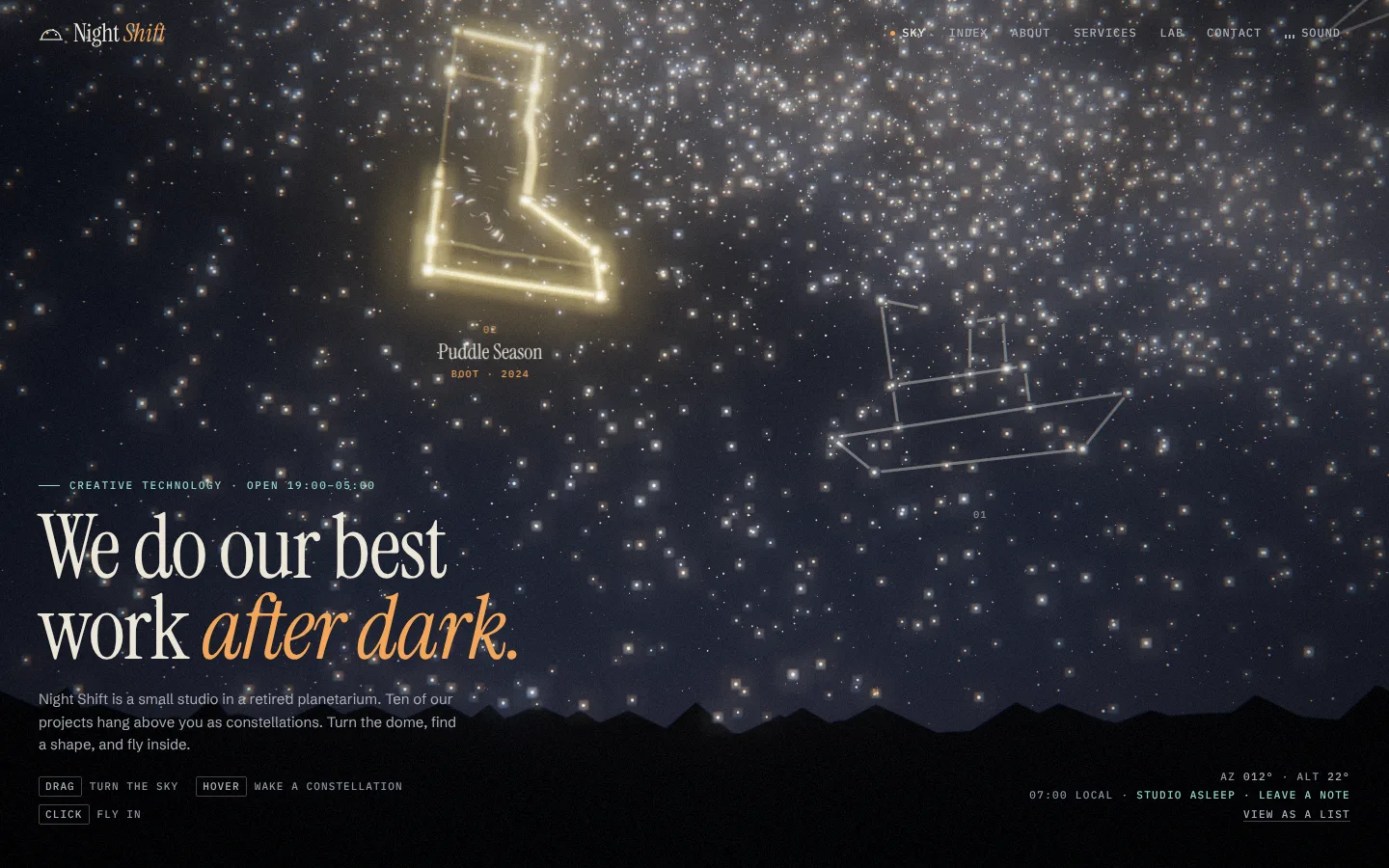
Night Shift is the portfolio of a fictional creative studio that works 19:00 to 05:00 from a retired planetarium. The home page is the inside of the dome at night: up to 320k GPU stars, a Milky Way baked once at startup, a treeline horizon and ten projects hung as constellations, each drawn in the shape of its subject (a ship, a rain boot, a lantern, a pocket watch, binoculars, a boombox, a whale, a rubber duck, a film projector and a compass rose). The palette is near-black night with sodium orange and a cool phosphor teal. Instrument Serif sets the headlines, Schibsted Grotesk the body and IBM Plex Mono every label and HUD readout.
Drag turns the dome with inertia, and the cursor drives a stable-fluids simulation that smears the starlight like a hand through mist. Hovering a constellation draws its lines in, decodes its name and plays a chime. Clicking swings the camera onto it and warps into a live 3D scene for that project, with a case study and two stills, and Back reverses the warp. About, Services as a night timetable, a Lab with three working experiments, a contact form and a flat Index complete the site.
Good for
- Creative and design studios: each constellation's shape is the project, so the sky doubles as the work index
- Freelance portfolios with 8 to 12 pieces: the prompt spaces projects about every 30–45° of the dome
- Planetariums, observatories and science centres: the Lab's light-pollution slider changes the real dome
- Agencies that want keyboard and list access: every constellation is a real button and an Index view lists the work
- Music or sound studios: the drone, chimes and warp whoosh are synthesised and the Lab has a drone tuner
How Night Shift is built
- Starlight smear from a fluid sim. A 2D stable-fluids solver on half-float ping-pong targets (curl, vorticity 18, 18 Jacobi pressure iterations, advection) runs at 64, 96 or 128 cells by tier; a composite pass samples the scene 10 times along the velocity field, and the sim sleeps 6 s after the last pointer move.
- Constellations that draw in. Lines are screen-space quads with a parameter t along each shape; on hover, a draw value rises over about 0.9 s so segments light in order, the stars take the project's accent and the name decodes from star-chart glyphs over 520 ms.
- Radial warp transition. The camera eases 520 ms to centre the shape, then over 950 ms a 20-tap radial zoom blur with per-channel offsets, a 34° FOV crush and a flash carry it into the project scene; Back runs the same steps in reverse.
- Device tiers. Before the renderer is created, a throwaway WebGL2 context reads the GPU name: software renderers get tier 0 (90k stars), touch or small screens tier 1 (120k), desktops tier 2 (320k), and an fps check lowers the pixel ratio when it falls under 40.
- Lazy project scenes. Each project scene (a GLB on a lit plinth with its own particle mode, or a code-built ferry on a shader ocean) is built on first open, cached and run through
compileAsyncbefore it is shown; hovering a constellation prefetches its model.
Images, video and 3D
Nine CC0 scanned GLB models repacked with quantised geometry and WebP textures (5.1 MB together, none over 0.95 MB), and 21 WebP stills at 1400px wide (two per project plus one for About) made with an AI image generator on a single 35 mm-at-night brief. The ferry, ocean, sky and every sound are built in code. Replace the models with CC0 or your own product scans fitted to 1.45 units, and regenerate the stills with one lens, light and grade.
Build it with Claude
Ask Claude for the full index.html. three.js loads through dynamic import() in a try/catch, so if WebGL or the import fails the page shows the work as a list, and each project opens as an article. In the preview, check that the Lab works there too: the drawing canvas names a constellation, the drone tuner reports whether sound is on, and the light-pollution slider updates its star count. Then check that the contact form asks for 20 characters in the message.
Claude guide →Build it with Claude Code
Put the nine models in assets/models/ and the 21 stills in assets/stills/, then serve with npx serve so the GLBs load. Ask Claude Code to open #work/puddle-season and #index directly to test hash routing, to compare ?tier=1 and ?tier=2 captures, and to load ?nogl to confirm the list mode scrolls and every project opens.
Build it with ChatGPT
Ask ChatGPT for the page in parts, or in canvas: the HTML and CSS, the project data with the ten shape polylines, the sky, star and line shaders, the fluid simulation, the post and warp passes, then sound and the Lab. A typical follow-up is the line shader: check it builds screen-space quads with a gap at each star, because plain THREE.Line is one pixel wide and cannot draw in along the shape.
If it doesn’t work
- Dragging feels loose or too fast: map pixels to radians with
fov / innerHeightso the sky follows the finger 1:1, and clamp the pitch to 0.04–1.32 rad. - The frame rate collapses on laptops without a GPU: detect software renderers through
UNMASKED_RENDERER_WEBGLand drop to tier 0 with a lower internal resolution. - Scanned models arrive black or too dark: add the RoomEnvironment PMREM (intensity .35), a key light and an accent rim light, and fit each model to 1.45 units on its longest side.
Questions about Night Shift
Can visitors browse Night Shift without dragging the sky?
Yes. Every constellation is also a real button that can be reached with the keyboard, the Index view lists all ten projects in order with their shapes, and each project has its own URL such as #work/lamplighters. Without WebGL the whole site becomes a scrolling list.
Does the Night Shift contact form send email?
No. It validates the fields, shows Sending… for 900 ms and then a confirmation card, but nothing leaves the page. Connect it to your own form endpoint before launch.
Make it yours
This prompt rebuilds one exact design. If everyone ships it unchanged, the sites will look alike. Before you paste it, change these lines so the result is yours. Each change is one edit to the prompt, and the structure and interactions stay intact.
- Studio and work. Replace Night Shift and the ten projects with your own studio, its hours and your real case studies. Keep 8–12 projects so the dome stays populated (about one every 30–45° of azimuth). Keep three short paragraphs and two stills per project so the panel scrolls in balance.
- The sky's subject. The dome of constellations is the signature. Re-theme it while keeping drag, inertia, fluid smear, hover draw-in and the warp. Some options: an underwater dome where projects are bioluminescent creatures and the smear reads as current; a city at night seen from a rooftop, with projects as lit-window patterns in towers; a microscope slide, where projects are cell clusters and the warp is a zoom through the objective; a festival field, where projects are lantern clusters. Keep the shape-from-the-project rule.
- Constellation shapes. Draw each project's shape from its subject: a cup for a café, a key for a locksmith, a bicycle for a courier app. Keep 8–20 stars and 7–20 lines per shape so they read at 8° radius.
- Palette. Swap
--sodium(#f2a65a) and--phosphor(#8fd3c8) and the ten accents for your brand. Keep the night ground at luminance < 3% and body text ≥ 4.5:1 against it. Avoid purple-indigo by default, and re-tint the light-pollution glow to match the new warm accent. - Type pairing. Replace Instrument Serif + Schibsted Grotesk + IBM Plex Mono with another display serif or grotesk, a plain body sans and a mono for the HUD. Keep the HUD and labels in mono so the planetarium feel survives.
- Project scenes. Swap the Poly Haven models for CC0 or your own GLBs of your products (one per project, fitted to 1.45 units), or code-built objects like the ferry. Change each particle mode to suit its subject (rain, embers, bubbles, moths, snow and so on).
- Stills. Regenerate or shoot two stills per project with one consistent lens, light and grade ("35 mm film at night, natural grain, no text, no logos"), export as 1400w WebP under 250 KB, and keep the same filenames or update the data.
- Voice and sound. Rewrite the copy in your own voice. Say what the work did ("night ridership rose 41%"), not "unlock your potential". Retune the drone root (36–80 Hz) and the chime scale to your brand.
Tell your AI: "Build exactly as specified, but with these changes: …", then list your edits.