✦ Members Site · E-commerce
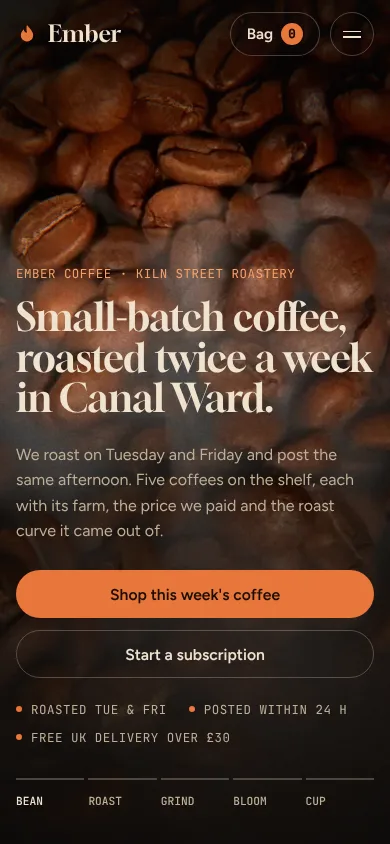
Ember Coffee Coffee roastery shop with a scroll-synced roast film
A specialty roastery where scroll runs a bean-to-cup film while a live roast curve draws, with a working shop and bag, subscriptions, a brew timer and wholesale. Bring your own video.
Unlock free with your emailPrompt 119 KB · code .zip 2.2 MB
Members
Unlock the prompt, demo and code
Free with your email. We send a confirm link; it unlocks every Members template on this browser.
Check your inbox
We sent the unlock link to . Open it in this browser and every Members template unlocks.
Nothing after a few minutes? Look in spam or promotions. Wrong address?
Unlocked on this browser
What's in the prompt
- A full written spec: layout, tokens, every animation with its numbers, responsive rules
- The complete working code as the reference implementation, also as a ready-to-run .zip with every image, video and 3D model
- Accessibility, reduced motion and fallbacks already handled
- A “Make it yours” checklist so your site looks like nobody else’s
- Type
- Site
- Built with
- HTML, CSS, JS · no libraries
- Prompt size
- 119 KB
- Tags
- coffee, scroll video, online shop, data visualisation, bring your own video
- Updated
- 2026-11-28
Use it in three steps
- Unlock it free with your email, then copy the prompt.
- Paste it into your AI (Claude, Claude Code, ChatGPT, Cursor…) and add your edits.
- Launch the single
index.htmlanywhere: Cloudflare Pages, Netlify, GitHub Pages.
About the Ember Coffee design
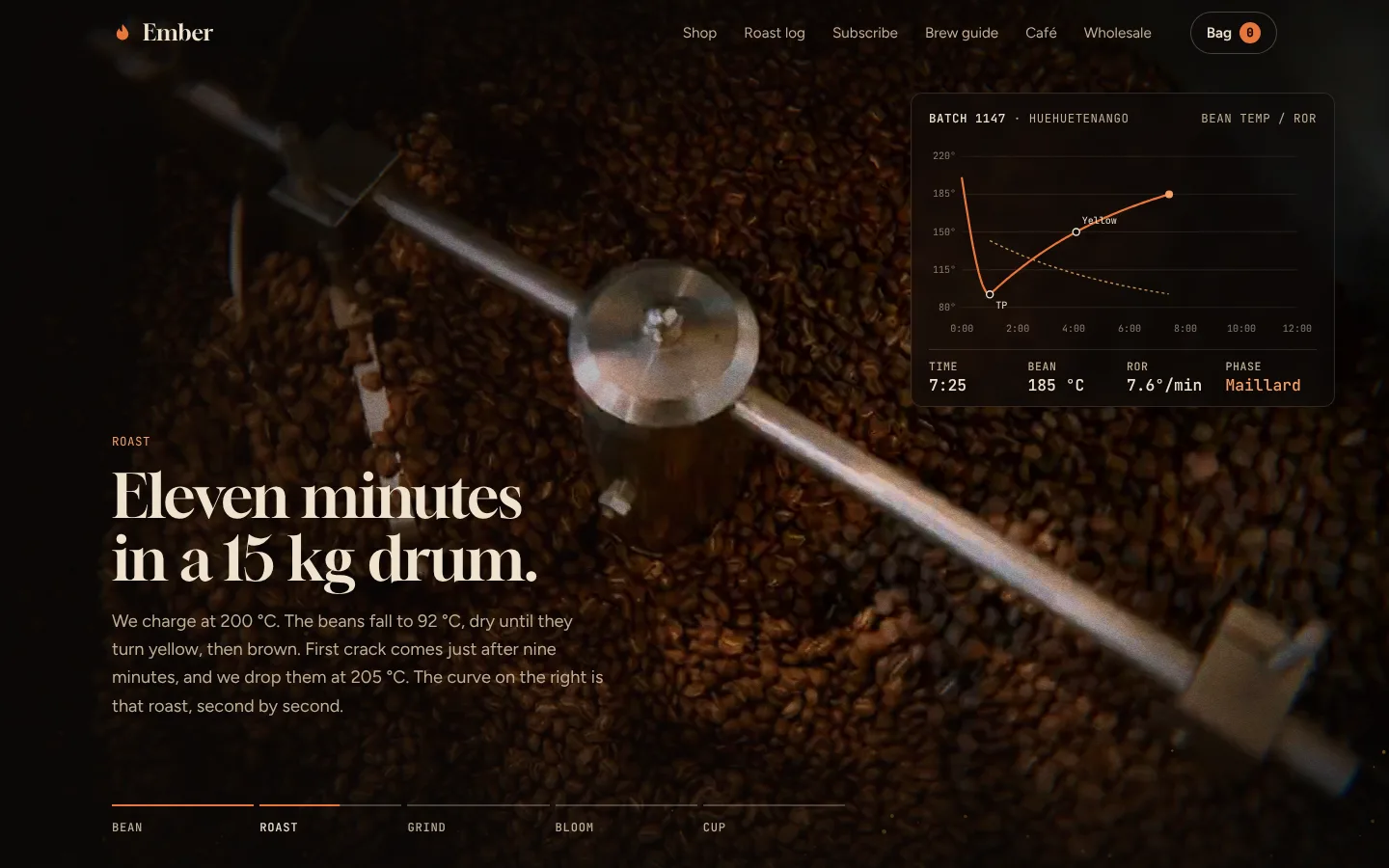
Ember Coffee is a landing page for a fictional specialty roastery on Kiln Street in Canal Ward, with a café, a web shop and a wholesale arm. The palette is roasted-brown dark grounds and warm paper with an ember-orange accent, a gold for the rate-of-rise line and rust on paper. Gloock sets the headlines, Figtree the body and JetBrains Mono every number and label. The signature is a 640vh section with a sticky macro film scrubbed by scroll, bean to cup in five shots: beans smoking in the cooling tray, the stirring arm, the grinder, a pour-over bloom and two espresso streams.
The first 40% of the film is also the roaster's clock: a live SVG roast curve draws bean temperature and rate of rise from 0:00 to 11:00, marks turning point, yellowing, first crack and drop as they pass, and fills a four-cell readout, while ember sparks rise with roast progress. A WebGL pass adds amber halation, a faint edge aberration, a tone curve and a vignette. Below come a shop with five origins and a bag drawer with checkout, a roast log with a keyboard crosshair, a sourcing table, a subscription builder, a brew guide with a step-calling timer, the café with today's hours, a wholesale estimator and form, an FAQ and a closing countdown to the next roast. The page is about 17.5 screens at 1440. You supply the footage; without it, five original stills run the same chapters.
Good for
- Coffee roasters with a web shop: origin cards, sizes, a bag drawer and a validated checkout are built in
- Roasteries that sell subscriptions and wholesale: both have live pricing and their own forms
- Cafés that want to show their process: the brew guide's timer calls each pour and scales with the dose
- Any maker with a measurable curve (a bakery, brewery, chocolate maker or tea house): swap the roast model and keep one curve, four markers and a readout
- Brands that publish what they pay: the sourcing table computes the season average from its own rows
How Ember Coffee is built
- Roast curve synced to film time. Roast progress is
clamp(sp / .40, 0, 1), so the curve completes as the drum shot ends. Bean temperature falls along a quarter sine to the turning point (92 °C at 1:00), then rises astp + A·(1 − e^(−(t−60)/k))withAsolved to land on 205 °C at 11:00; RoR is the derivative × 60, and first crack (≈ 9:04) is solved in closed form. - One seek in flight, film in memory. The MP4 is fetched with a stream reader so the preloader shows real bytes, then played from a Blob URL. Each frame
sp += (target − sp)·min(1, dt·8); only one seek runs at a time, the newest target runs onseeked, and seeks under 1/40 s are skipped. - Halation post pass. A full-screen triangle samples the video with cover-fit UVs, adds 16 halation taps of
max(colour − .62, 0)tinted orange with a glow uniform that rises through the roast and peaks on the espresso, plus edge aberration, an S-curve and a vignette. After eachseekedit redraws for 3 frames so the texture never lags a decode. - Ember sparks with roast progress. 80 additive sparks (34 on phones) rise 20–70 px/s with a sine drift on one 2D canvas, at intensity
.35 + .65 · roastProgressduring the roast shots, then fade out. - Shop and subscription maths. 1 kg costs 3.4 × the 250 g price rounded to 50p; delivery is £3.95, free from £30 with a progress bar, and the bag persists in localStorage. Subscriptions apply size multipliers of 1 / 1.9 / 3.5 and 15%, 10% or 5% off by frequency, and show price per delivery, per month and per cup.
Images, video and 3D
The download includes twelve original photographs made with an AI image generator in one warm tungsten, low-key grade, with smaller srcset copies (24 files, about 2.2 MB): five film-fallback stills (roast, cooling tray, grinder, bloom, espresso), five origin photos, the café and wholesale. The macro film in the live demo is licensed stock footage for the demo only, so it is not in the download or the prompt. You supply your own: ember-1920.mp4 (1920×1080, 30 s, 15 fps, every frame a keyframe, about 8–10 MB), a 720×1280 portrait crop (about 4–5 MB) and a WebP poster for each, cut as five 6-second shots in bean-to-cup order, placed in assets/film/ with CONFIG updated. The prompt has the exact ffmpeg command, or use the free encoder at /tools/scroll-video-encoder/. Until then the page runs on the stills. Members template: unlock free with your email.
Build it with Claude
Ask Claude for the full index.html in one pass. The preview has no film, so the "Film off · showing stills" pill appears and the roast HUD, embers, chapters and rail still run from scroll (the photos appear once the assets folder sits next to the file). Check that 1 kg of a coffee costs 3.4 times the 250 g price, that the bag reaches free delivery at £30, that checkout rejects a bad email, and that the brew timer moves to the next step at 0:45 and 1:15.
Claude guide →Build it with Claude Code
Cut your five shots to 6 s each, encode them with /tools/scroll-video-encoder/ (every frame a keyframe), put the files in assets/film/ and point CONFIG there; if your roast shots run longer or shorter, change CONFIG.chapters and CONFIG.roastShots. Serve with python3 -m http.server. Ask Claude Code to scroll headlessly and confirm the HUD reaches 11:00 as the drum shot ends, that the film-missing path shows the stills with no script errors, and that the bag survives a reload.
Build it with ChatGPT
Ask ChatGPT for the page in parts, or in canvas: the HTML and CSS, the film loader and scrub, the WebGL pass and embers, the roast model and HUD, then the shop and bag, roast log, subscription, brew guide and wholesale. A common follow-up is the roast model: check that the curve is solved to land exactly on the drop temperature at the drop time, or the markers and readouts will drift from the chart.
ChatGPT guide →If it doesn’t work
- Scrubbing steps or jumps: the clip must be all-intra, so re-encode with /tools/scroll-video-encoder/ or
-g 1 -keyint_min 1in ffmpeg. - The film never appears when the page is opened from a folder: serve it over http so the streamed fetch can run.
- The roast curve finishes before or after the drum shot: the roast spans the first 40% of the film, so cut your first two shots to match or change
CONFIG.roastShots. - The bag looks empty after a reload in a private window: it is saved in localStorage, which some browsers block; the page still works, but the bag is not kept.
Questions about Ember Coffee
Is the Ember Coffee film included in the download?
No. The film in the live demo is licensed for the demo only, so the download leaves it out and opens on the stills. Supply your own: a 1920×1080 all-intra MP4, a 720×1280 portrait crop and a poster for each, then point CONFIG at them. The prompt has the ffmpeg command, and /tools/scroll-video-encoder/ makes clips scroll-ready.
What footage works best for the bean-to-cup film?
Five 6-second macro shots in this order: beans in the roaster or cooling tray, the drum or stirring arm, grinding, a pour-over bloom and espresso extraction, joined with 0.5 s crossfades at 6, 12, 18 and 24 s. Use slow camera moves, dark backgrounds and no text, and grade every shot to one warm look.
Is the roast data real?
No. The curve is a model of one 11-minute roast (charge 200 °C, turning point 92 °C at 1:00, first crack about 9:04, drop 205 °C), and the footer says the producers, prices and roast data are made up. Put your own figures into the data objects at the top of the script.
Do orders, subscriptions and wholesale requests get sent anywhere?
No. Each form validates and returns a reference (EMB-, EMS- or EMW- plus six characters), but nothing is posted to a server. Connect them to your shop and email before launch.
What happens on phones, with reduced motion or without WebGL?
Phones under 700px wide get the portrait cut, a full-width HUD and 34 embers instead of 80. With reduced motion the film shows one frame per chapter, the HUD shows the finished roast and there are no embers. Without WebGL the plain graded video shows under a CSS shade and grain.
Make it yours
Everyone who pastes this prompt gets the same roastery unless they change it. Keep the structure and every interaction, and make these edits first:
- Brand and place. Rename Ember, Kiln Street and Canal Ward, the five coffees and their producers, and set your own roast days and cut-off. Keep five coffees (the grid is built for five plus the tasting card) and keep names under 26 characters so the cards stay even.
- Re-theme the signature. The scrubbed film + synced chart works for any process with a measurable curve: a bakery (dough proof → oven → crust, chart oven and core temperature), a brewery (mash → boil → fermentation, chart gravity and temperature), a chocolate maker (roast → conch → temper, chart the tempering curve) or a tea house (wither → roll → oxidise). Keep one curve, four named markers and a four-cell readout.
- Palette. Swap
--ember,--goldand--rustfor your accent family and the paper tones for your light ground. Keep the accent warm and bright enough to read on dark footage, and keep--ink-dimand--cream-dimat 4.5:1 or better on their grounds. - Type pairing. Replace Gloock and Figtree with another high-contrast serif and a plain sans, such as DM Serif Display with Instrument Sans or Fraunces with Work Sans. Keep a monospace for every number, price and timer.
- Footage and photographs. Shoot or license your own five shots to the spec above, and regenerate the stills, origin, café and wholesale pictures as one set: one lens, one warm grade, no text or logos.
- Recipes and pricing. Put in your own brew recipes, subscription prices and discounts, delivery threshold and wholesale tiers; the maths is all in the data objects at the top of the script.
- Copy voice. Write every chapter and lede as a fact with a number in it ("First crack comes just after nine minutes"), not a mood line, and keep the fictional-figures note in the footer until the numbers are real.
"Build exactly as specified, but with these changes: …"
Commissions
Want Ember Coffee for your brand?
We build it for you: your story, your copy, motion made for your brand, live on your domain. Two projects a month, so each one gets the same care as this template.
- A cinematic site made for your brand, not a reskin
- Original motion and imagery made for your story
- Fast on phones, accessible, yours to keep
Thank you. We have it.
We read every inquiry ourselves and reply from hello@copytheprompt.design within two working days. Add that address to your contacts so the reply doesn’t land in spam.