Site · Landing page
Fenlight Solar co-op where scroll runs the day
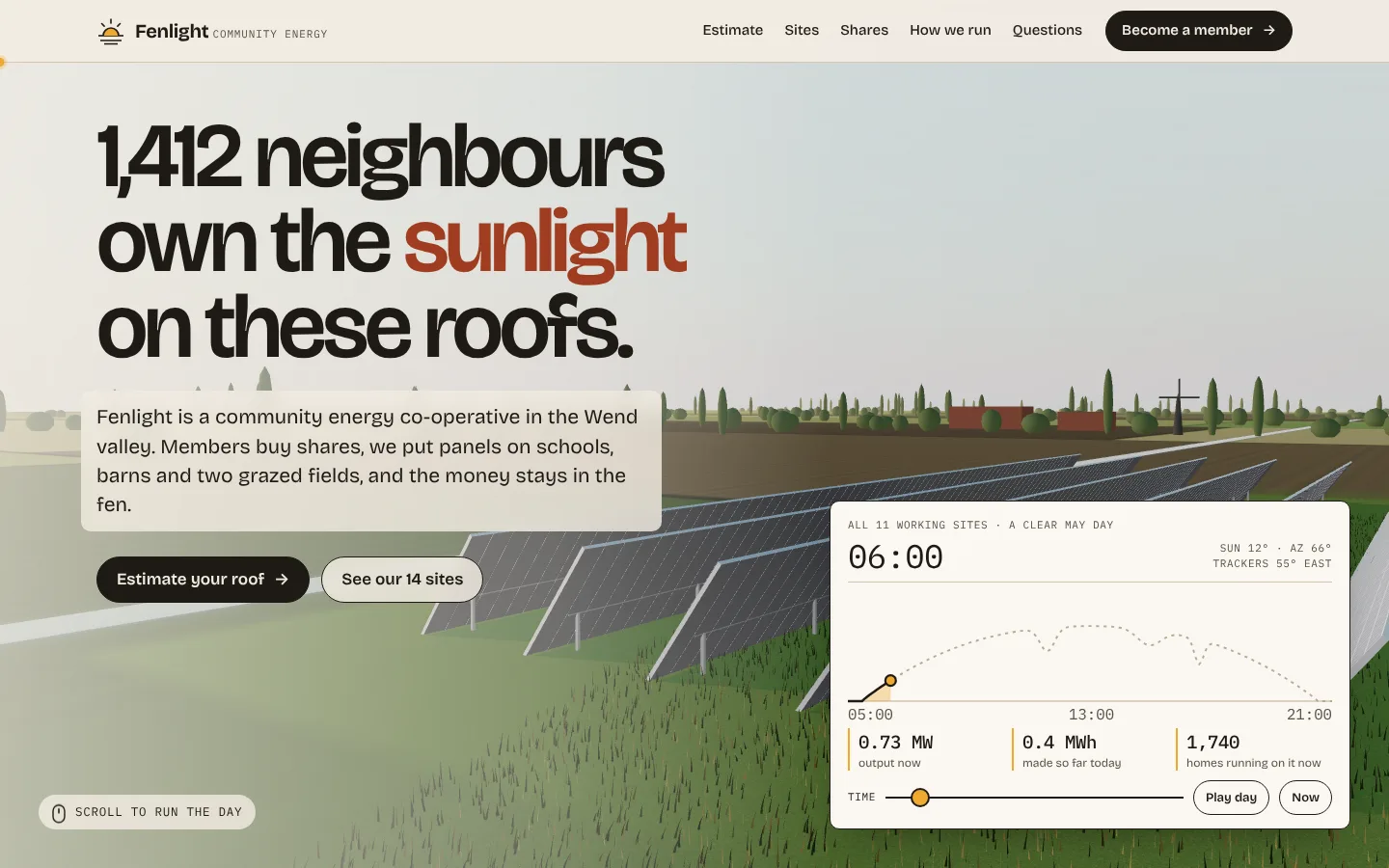
Scroll moves the sun across a live 3D solar farm while rows of solar trackers follow it and today's output curve draws. Roof estimator, sites map and share calculator.
What's in the prompt
- A full written spec: layout, tokens, every animation with its numbers, responsive rules
- The complete working code as the reference implementation
- Accessibility, reduced motion and fallbacks already handled
- A “Make it yours” checklist so your site looks like nobody else’s
- Type
- Site
- Built with
- HTML, CSS, JS · three.js 0.170.0
- Prompt size
- 127 KB
- Tags
- energy, calculator, map, landing page
- Updated
- 2026-11-26
Use it in three steps
- Copy the prompt with the button above.
- Paste it into your AI (Claude, Claude Code, ChatGPT, Cursor…) and add your edits.
- Launch the single
index.htmlanywhere: Cloudflare Pages, Netlify, GitHub Pages.
About the Fenlight design
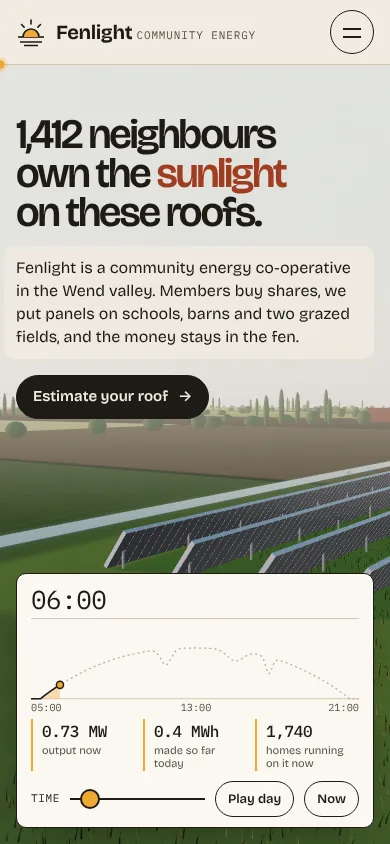
Fenlight is a landing page for a fictional community energy co-operative in the fens, where 1,412 members own 3.56 MWp of panels on schools, barns and two grazed fields. The page reads as one day: each section is stamped with a time from 06:20 to 21:30 and a small sun-arc glyph, on warm paper with ink, a sun yellow used only for fills and a rust accent. Bricolage Grotesque carries the headlines and IBM Plex Mono every figure. The signature is a live three.js solar farm in a 280vh scroll track: scrolling moves the sun from 06:00 to 20:45 and twelve rows of single-axis trackers turn to follow it, so a visitor watches the asset they would be buying into at work.
In the hero, sheep graze the aisles, grass moves in the wind and the camera leans toward the light, while an instrument card draws the day's output curve up to the current minute with live MW, MWh and homes-powered figures. A time slider, Play day and Now buttons sit on the card. Further down are a roof and field estimator with a compass dial, a filterable SVG map of 14 sites, a share calculator with a validated join form, a bar showing where each £1 goes, an FAQ and a sunset footer.
Good for
- Community energy groups: shares, one-member-one-vote and a site map are already in the structure
- Solar installers: the roof estimator gives kWp, kWh, CO₂ and payback from a few inputs
- Agrivoltaic or land projects: the prompt suggests an orchard or grazed fields under the panels
- Schools and trusts with solar roofs: the map and site cards list each host building
- Any service tied to daylight: one sun function drives the 3D, the curve and the stats
How Fenlight is built
- One sun model for everything. With h = (t − 780)/480, elevation 62·cos(h·π/2)° and azimuth 180 + 130·h° feed the 3D sun, the tracker angles and the output curve P = 3.558·0.84·sin(e)^0.9 MW with three cloud dips, plus the running MWh total and the homes figure.
- Scroll-driven clock. Progress through the 280vh hero maps to 06:00–20:45; once the slider or Play has set a time, scrolling moves the clock relatively by Δp × range so it never jumps.
- Sun-tracking instanced panels. Twelve rows of 72 panels are one InstancedMesh; the target tilt −atan2(sunX, sunY) is clamped to ±55°, scaled down below 6° of elevation, flat at night, and the rows glide to it at dt·3.2 like a slow motor.
- Sky reflected in the glass. A Preetham Sky feeds PMREMGenerator.fromScene, regenerated only when the sun moves more than 1.2° in elevation or 5° in azimuth (at least 120 ms apart), so the clearcoated panel glass reflects the current sky without a bake every frame.
- Compass-dial estimator. A 150px SVG role=slider snaps to 5° and takes arrows, Shift, PageUp/PageDown, Home and End; the facing, pitch and regional yield (820–1,040 kWh per kWp) feed kWh, homes, CO₂, payback and 12 monthly bars.
Images, video and 3D
One meshopt sheep GLB (about 770 KB) made with an image-to-3D tool and cloned eight times, plus 11 site photos (a school, an installer, sheep at sunrise, a maltings, frost on a panel, an AGM and five more host buildings) at 1400px wide (900 for portraits), WebP q74, in one desaturated documentary grade. To make your own, generate one clean studio image of your animal or object and convert it to GLB, then regenerate the site photos in one light with no text or logos.
Build it with Claude
Ask Claude for the full index.html. The preview will not have the GLB or photos, but the 2D canvas landscape draws from the first frame. Drag the time slider and check that the clock, the curve, the MW and homes figures and the tracker angle agree, then try the estimator: choosing Field or a flat roof should disable the compass dial.
Claude guide →Build it with Claude Code
Put sheep.glb and the 11 WebP photos in assets/ and serve with python3 -m http.server, since the GLB cannot load from file://. Ask Claude Code to use ?still for screenshots on software GL, confirm the 2D canvas stays when three.js is blocked, and test the join form (UK postcode, £50–£20,000 for shares, the 16+ box) at 390 and 1440.
Build it with ChatGPT
Ask ChatGPT for the classic script (sun model, UI, 2D fallback and render loop), the three.js module and the CSS as separate parts, or in canvas. The usual follow-up is keeping the numbers in sync: check that the curve, the stats and the trackers all call the same sunAt function, and that the estimator's payback formulas match the prompt.
ChatGPT guide →If it doesn’t work
- The clock jumps when you scroll after using the slider: move time relatively by Δp × range once a time has been set, and only snap to the ends at p = 0 or 1.
- Frame rate drops while the sun moves: regenerate the PMREM sky only past the 1.2° / 5° thresholds, and render on demand when ambient motion is off.
- The page waits on a blocked CDN: if the module has not started 3 s after the preloader begins, finish on the 2D landscape and let the 3D fade in whenever it arrives.
Questions about Fenlight
Are Fenlight's energy figures real?
No. Fenlight is fictional and the footer says its figures are illustrative. The estimator uses stated assumptions, such as 0.7 × 0.21 kWp per m² of roof and 500 kWp per hectare of field, and its assumptions panel rewrites itself for the current inputs.
What does the page show without WebGL?
A 2D canvas version of the same day: the sky ramp, sun and drifting clouds, a horizon with poplars, a church and a turning windpump, a field patchwork and ten rows of projected tracker panels with sun shadows. Everything else on the page works unchanged.
Make it yours
This prompt rebuilds one exact design. If everyone ships it unchanged, the sites will look alike. Change these before you paste it; the structure and the interactions stay intact.
- Brand and offer. Swap Fenlight, the Wend valley and the 14 sites for your own co-op, farm, school trust or installer. Keep 10–16 sites, three pin types and a headline that states one hard number ("1,412 neighbours…") so the hero and the map stay balanced.
- The signature scene. Keep "scroll runs the day" but change what the sun drives: rooftop panels on a terraced street, a floating array on a reservoir, an agrivoltaic orchard, a solar carport with EVs charging, or a wind-and-solar hybrid. Keep the tracker logic, the camera yaw and the output curve.
- The animals and ambient life. Replace the GLB sheep with geese, cattle, bees over wildflowers or cyclists on a lane; generate one clean studio image, turn it into a GLB and keep the amble/pause loop.
- Palette. Replace paper, ink, sun, rust and fen with your own five; keep muted text ≥ 4.5:1 on the paper and keep one warm fill colour that only ever means "sun".
- Type pairing. Swap Bricolage Grotesque + IBM Plex Mono for another characterful display sans or serif with a mono for figures (e.g. Instrument Serif + JetBrains Mono, Schibsted Grotesk + DM Mono).
- The day. Change the date and place: a December day (sun max 15°, sunrise 08:05) makes a moodier hero; a southern-hemisphere site turns the camera north. Update the time stamps on each section.
- Photos. Regenerate the 11 site photos for your own buildings in one consistent light and grade; keep no text or logos in them and keep the glass tags and cell reveals.
- Copy. Rewrite every line in your own voice with your real figures and say exactly what a member gets ("12p in every £1 goes to loft insulation", not "make an impact").
Tell your AI: "Build exactly as specified, but with these changes: …", then list your edits.