Hero · Hero section
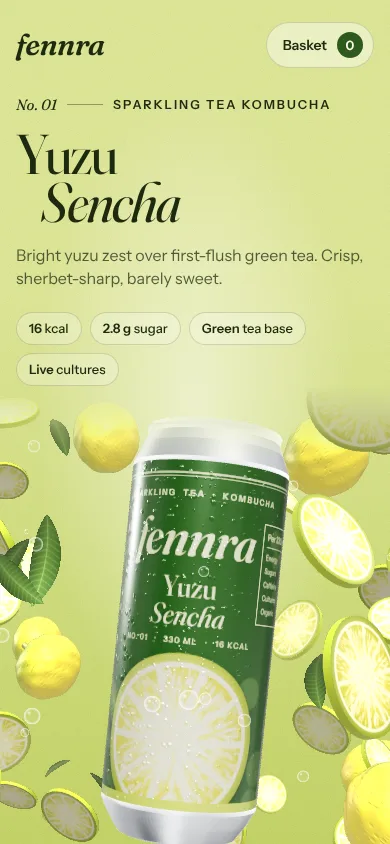
Fennra 3D drink can hero with a flavour pour
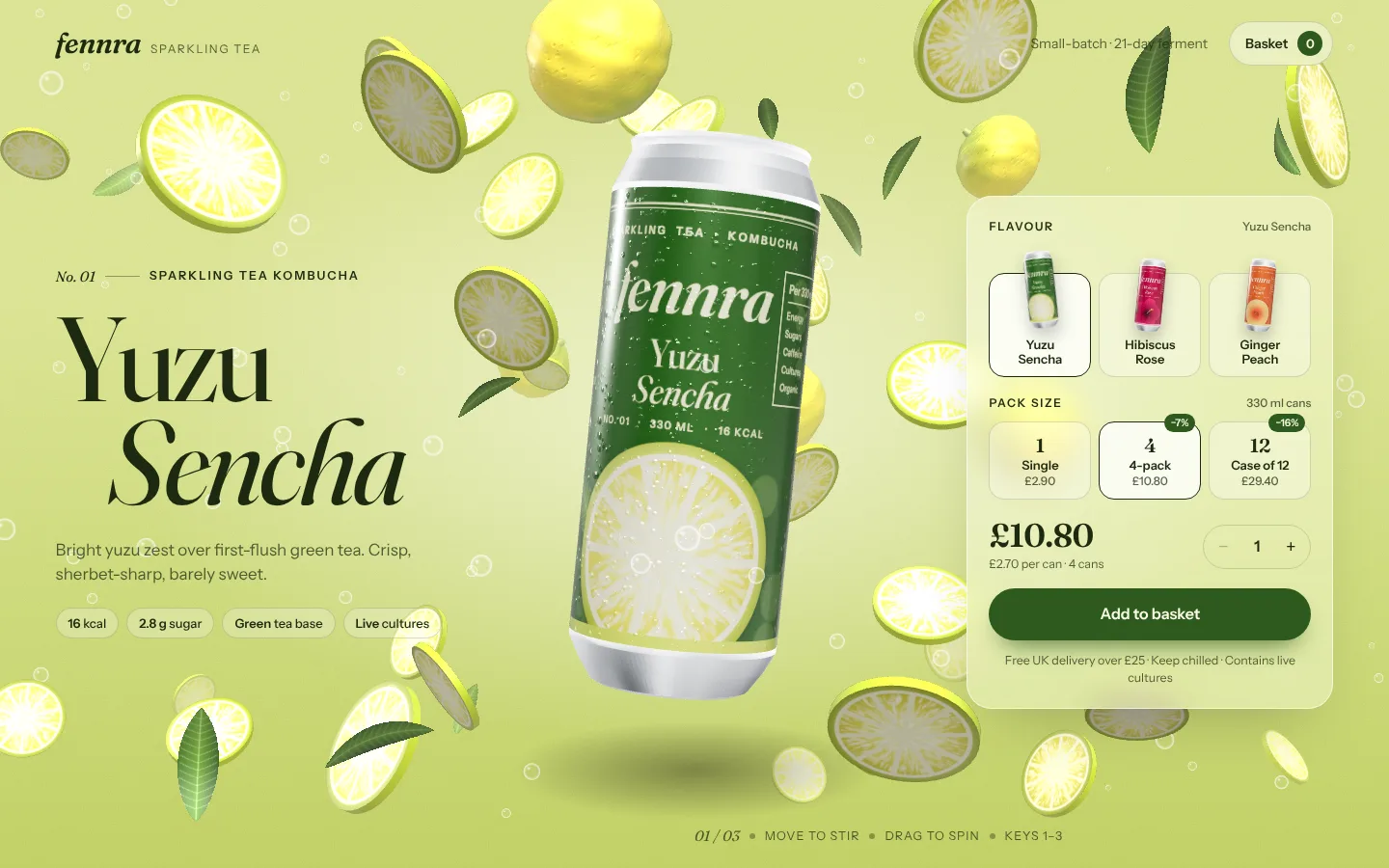
A live 3D can tilts to the cursor while botanicals swirl around it. Switching flavour pours a new colour across the screen.
What's in the prompt
- A full written spec: layout, tokens, every animation with its numbers, responsive rules
- The complete working code as the reference implementation
- Accessibility, reduced motion and fallbacks already handled
- A “Make it yours” checklist so your site looks like nobody else’s
- Type
- Hero
- Built with
- HTML, CSS, JS · three.js 0.160.0
- Prompt size
- 85 KB
- Tags
- three.js, product hero, beverage, 3d model
- Updated
- 2026-11-26
Use it in three steps
- Copy the prompt with the button above.
- Paste it into your AI (Claude, Claude Code, ChatGPT, Cursor…) and add your edits.
- Launch the single
index.htmlanywhere: Cloudflare Pages, Netlify, GitHub Pages.
About the Fennra design
Fennra is a one-screen product hero for a fictional sparkling tea kombucha with three flavours. Each flavour owns a pastel page colour, a deep can colour and a dark ink, and the whole page changes between them. Fraunces in large italic type gives the headline a drinks-label feel, while Instrument Sans runs the buy panel. A three.js can built in code floats in the centre, surrounded by 3D fruit slices, leaves and whole fruit for the current flavour. The signature is The Pour: choosing a flavour fills the page from the bottom with that flavour's colour, like liquid, which ties the colour change to the drink itself.
A visitor sees the headline and tasting note on the left, the can in the middle and a frosted buy panel on the right. The can tilts toward the cursor, turns slowly and can be dragged to spin, while the botanicals drift and scatter from the pointer and bubbles rise. Picking a flavour sends colour rising up the page under a sloshing wave, spins the can twice with motion blur on the label, re-prints the label from the bottom up and pulls the fruit into a vortex before throwing it back out. Pack size, quantity and Add to basket feed a slide-in basket.
Good for
- Beverage brands: three variants map to the three-flavour picker
- Coffee and cold brew: the prompt suggests an espresso crema pour
- Skincare or supplements in tubes or bottles: the lathe container can change shape
- Snack brands: the botanicals can become your ingredients
- Product launch pages: one screen holds the product, story and buy panel
How Fennra is built
- Procedural can from lathe geometry. The body is a 128-segment CylinderGeometry with clearcoat and a 900-droplet condensation bump map; the shoulder, lid and base are LatheGeometry profiles in brushed aluminium with anisotropy .75, plus an extruded pull tab.
- Label re-print wipe shader. An onBeforeCompile patch blends the current and next label with a noisy wipe edge (uWipe 0→1 over 280–1230ms) and a white ink line that only shows mid-wipe.
- Rotational motion blur. Nine taps along the label's u coordinate, with uBlur = min(.14, |ω|·.0045) taken from the can's measured angular velocity, blur the print during the 720° spin instead of blurring the whole element.
- Liquid colour pour. On a flavour change a full-viewport layer rises over 1350ms carrying two sloshing SVG waves while the scene fog colour lerps to the new pastel, so the page appears to fill with the drink.
- Instanced botanicals on springs. 30 slices, 12 cupped leaves and 8 whole fruit are InstancedMeshes on springs (k 9, c 3.4 at rest) that the pointer pushes away within 190px and a vortex pulls around the can during the pour.
Images, video and 3D
Only three transparent can renders (can-yuzu, can-hibiscus, can-peach WebP, about 640×1100) used for the picker thumbnails and the no-WebGL fallback; the labels, slices, leaves and droplets are drawn in code. The prompt's ?shot=yuzu|hibiscus|peach mode renders the bare can on transparent, so you can produce your own thumbnails from your own build.
Build it with Claude
Paste the prompt and ask for the whole index.html. If the preview cannot load three.js you will see the 2D fallback, which still lets you check the flavour radios, keys 1–3, the pack prices (Single £2.90, 4-pack £10.80, case £29.40) and the basket drawer's £25 free-delivery bar.
Claude guide →Build it with Claude Code
Create index.html and assets/ with the three can WebPs, then serve with npx serve so the module imports and images load like they will online. Ask Claude Code to open ?shot=hibiscus to export a fresh thumbnail, check ?nogl at 390 for horizontal overflow, and confirm a flavour change queues when one pour is already running.
Build it with ChatGPT
Ask ChatGPT to split the work into the label canvas drawing, the can and botanical geometry, the pour choreography and the buy-panel UI, delivered across replies or in canvas. Typical follow-ups are the label seam (the back panel must be drawn on both edges so it wraps) and checking that the botanical homes avoid the copy column and buy panel on wide screens.
ChatGPT guide →If it doesn’t work
- The label faces away from the camera: create the body cylinder with thetaStart π so u = 0.5 faces forward.
- Botanicals pile up behind the headline or the buy panel: resample each home (up to 40 tries) when it lands in the can column, the copy area or the panel area, as the spec lists.
- Spring motion differs between 60 and 144 Hz screens: integrate in substeps of at most 34ms over real frame time, capped at .3s.
Questions about Fennra
Does the Fennra can use a 3D model file?
No. The can is built in three.js from cylinder and lathe geometry, and its labels are drawn on 2048×1360 canvases after the fonts load. The only images are three can renders used as thumbnails and as the no-WebGL fallback.
Can I use a bottle instead of a can?
The prompt suggests a taller lathe with a neck and crown cap for a bottle, or a gable-top box for a carton. Keep the label on a cylinder or plane so the wipe and motion-blur shader still works.
Make it yours
This prompt rebuilds one exact design. If everyone ships it unchanged, the sites will look alike. Before you paste it, change these lines so the result is yours. Each change is one edit to the prompt; the structure and the interactions stay intact.
- Brand and range. Swap "Fennra" and the three flavours for your own drink: a cold brew, a craft soda, a hard seltzer, an oat milk. Keep exactly three variants with names of two words, so the headline stays two lines and the picker stays three tiles.
- The pour. The rising colour is the signature. Re-theme what rises to fit your drink: thick and slow for a smoothie or milk (lower the wave amplitude, lengthen it to 1.8s), fizzy and fast for soda (more bubbles, a 900ms pour), a dark espresso crema line for coffee (a foam colour of
#d8b48a). Keep the can spin, the label re-print and the vortex in sync with it. - The botanicals. Replace yuzu / hibiscus / peach with your own ingredients: coffee beans and cacao pods, mint and lime wedges, oats and berries. Keep three kinds per flavour (slice, leaf, whole) and swap only the canvas art and the procedural geometry recipe.
- Palette. Give each variant a pastel page colour, a deep can colour and a dark ink. Check that each ink is ≥ 4.5:1 on all three pastels, because text sits on both colours mid-pour.
- Container. Change the can profile for a bottle or a carton: a taller lathe with a neck and crown cap, or a box made of BoxGeometry with a gable top. Keep the label on a cylinder or a plane so the wipe shader still works.
- Type pairing. Swap Fraunces + Instrument Sans for a display face that suits the drink (a condensed grotesk for energy, a rounded sans for kids) plus a plain sans for body text. Redraw the label wordmark in the same face.
- Pack and price. Use your real pack sizes and prices, and your free-delivery threshold. Keep three packs so the selector balances.
- Copy. Rewrite the tasting notes and chips in your own voice. Name real ingredients and numbers ("first-flush green tea, 16 kcal"), not adjectives.
Tell your AI: "Build exactly as specified, but with these changes: …", then list your edits.